Video Quality
Android
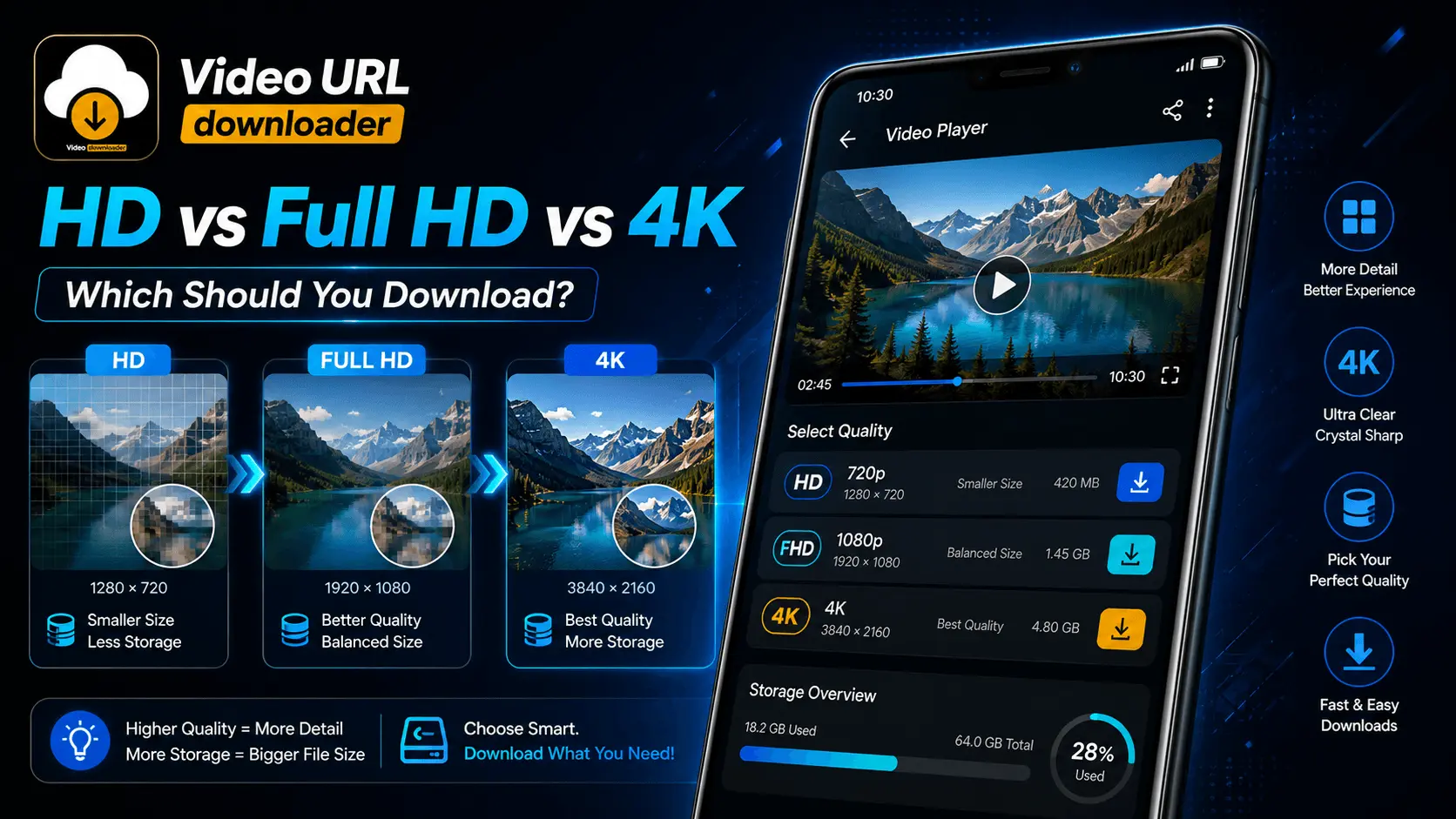
HD vs Full HD vs 4K
Beginner
When downloading a video on Android, choosing the highest available quality can seem like the obvious option. If a video is available in HD, Full HD, and 4K, it is easy to assume that 4K must always be the best choice.
In practice, the right video quality depends on several factors. Your phone's display, available storage, mobile data, viewing distance, video content, and how you plan to watch the file can all influence which resolution makes the most sense.
A Full HD video may be the best balance for everyday smartphone viewing, while HD can be more practical when storage or mobile data is limited. On the other hand, 4K can be worthwhile when you have a high-resolution display and want to preserve more visual detail.
This guide explains the differences between HD, Full HD, and 4K videos and helps you decide which quality you should download for different situations.
- What Video Resolution Means
- What Is HD Video?
- What Is Full HD Video?
- What Is 4K Video?
- HD vs Full HD vs 4K Comparison
- How Resolution Affects File Size
- Continue: Choosing the Right Quality
What Does Video Resolution Mean?
Video resolution describes the number of pixels used to create the visible image. In simple terms, more pixels can provide more image detail when the source video, display, and viewing conditions support that additional detail.
You may see video quality options written as 720p, 1080p, or 2160p. These numbers generally refer to the vertical pixel dimension of the video.
| Common Label | Typical Resolution | General Category |
|---|---|---|
| HD | 1280 × 720 | High Definition |
| Full HD | 1920 × 1080 | Full High Definition |
| 4K / UHD | 3840 × 2160 | Ultra High Definition |
These are common consumer video resolutions, although actual dimensions and formats can vary depending on the source and encoding.
What Is HD Video?
HD, commonly associated with 720p in this comparison, provides substantially more detail than older standard-definition video while keeping the resolution and file requirements relatively manageable.
On a smartphone, HD can be perfectly suitable for casual viewing. If your phone has a smaller display, the visual difference between HD and higher resolutions may not always be obvious during normal viewing.
HD Can Be a Good Choice When:
- You want smaller download files.
- Storage space is limited.
- You are using a smaller smartphone display.
- You mainly watch videos casually.
- You want to reduce data consumption.
What Is Full HD Video?
Full HD generally refers to 1920 × 1080 resolution, commonly called 1080p. It provides a noticeable increase in pixel detail compared with 720p and remains a practical choice for many Android users.
For everyday smartphone video, Full HD is often a strong middle ground. It provides more detail than standard HD without requiring as much storage as a typical 4K file.
More Detail
1080p contains substantially more pixels than 720p and can preserve additional visual detail.
Practical Size
Full HD usually requires less storage than 4K while still offering strong quality for smartphone viewing.
Versatile
It works well for everyday viewing, sharing, and offline playback on many devices.
What Is 4K Video?
4K video, commonly represented by 3840 × 2160 resolution in consumer devices, contains four times as many pixels as 1920 × 1080 Full HD when comparing the total pixel dimensions.
The additional resolution can preserve more fine detail, especially on larger displays or when the source video and playback device can take advantage of it.
A 4K file is not automatically better in every situation. The quality of the original source, encoding, display, and viewing conditions also affect the final result.
HD vs Full HD vs 4K: Quick Comparison
| Factor | HD | Full HD | 4K |
|---|---|---|---|
| Typical Resolution | 1280 × 720 | 1920 × 1080 | 3840 × 2160 |
| Image Detail | Good | Very Good | Very High |
| File Size | Usually Smaller | Medium | Usually Larger |
| Storage Requirement | Lower | Moderate | Higher |
| Data Requirement | Lower | Moderate | Higher |
| Small Phone | Suitable | Excellent | May Be More Than Needed |
| Large High-Resolution Display | Good | Very Good | Excellent |
Why 4K Contains More Detail Than Full HD
Resolution becomes easier to understand when you compare total pixel counts.
720p
About 0.9 million pixels
1080p
About 2.1 million pixels
4K
About 8.3 million pixels
This difference explains why higher-resolution video can retain more fine visual information. It does not, however, mean that every viewer will always see a dramatic improvement.
How Video Quality Affects File Size
Higher resolution generally means that more visual information needs to be stored, but resolution alone does not determine the final file size.
Video duration, bitrate, codec, frame rate, audio settings, and compression efficiency can all influence how large a downloaded video becomes.
Think of Quality as a Trade-Off
Higher quality can provide more detail, but it can also require more storage and data. The best choice is the quality that gives you the visual experience you need without unnecessary resource usage.
The Highest Quality Is Not Always the Best Choice
Choosing 4K every time can quickly fill your phone's storage if you download many long videos. If the phone display is relatively small, the additional detail may also be difficult to appreciate during normal viewing.
Conversely, choosing HD for every video may not make sense when you have a large high-resolution display and plenty of storage.
Choose video quality based on your device and purpose, not simply because the highest number is available.
How to Choose the Right Video Quality
The right download resolution depends on what you plan to do with the video. A short clip watched occasionally does not necessarily need the same quality as a long video you want to keep for offline viewing.
Instead of automatically selecting the highest available option, consider your phone's display, available storage, internet connection, and how important visual detail is for that particular video.
| Your Situation | Practical Choice | Why |
|---|---|---|
| Limited storage | HD | Uses less storage in many cases. |
| Everyday smartphone viewing | Full HD | Strong balance of quality and file size. |
| High-resolution display | Full HD or 4K | Higher resolution can preserve more detail. |
| Large screen playback | 4K | Additional resolution can be more noticeable. |
| Long-term quality preservation | 4K when appropriate | Retains more source detail when supported by the source. |
Is HD Enough for a Small Android Phone?
In many everyday situations, HD can be perfectly usable on a smaller smartphone display. The smaller physical viewing area can make differences between resolutions less obvious, especially when you are watching from a normal handheld distance.
HD can also be useful when you want to keep multiple videos offline without consuming large amounts of storage.
Consider HD When:
- Your phone has limited storage.
- You download many videos.
- You primarily watch short clips.
- You are using mobile data with a limited allowance.
- Maximum visual detail is not important for the video.
Why Full HD Is a Strong Everyday Choice
Full HD is often the practical middle ground for Android users. At 1920 × 1080, it provides substantially more pixel information than 720p while avoiding the much larger resolution jump associated with 4K.
If you want good detail but do not want every downloaded video to consume as much storage as a 4K version, Full HD can be a sensible default when that quality is available.
Good Detail
1080p can provide a sharp viewing experience on many smartphone displays.
Moderate Storage
It generally avoids the larger storage requirements associated with higher-resolution video.
Flexible Use
Full HD works well for everyday offline viewing and many different types of video content.
When Should You Download 4K Video?
4K can be worthwhile when preserving visual detail is more important than minimizing file size. It is particularly useful when your playback device has a high-resolution display or when you expect to watch the video on a larger screen.
4K May Make Sense When:
- Your device or display supports high-resolution playback.
- You have enough available storage.
- You have a reliable connection for larger downloads.
- The source video was genuinely produced at high resolution.
- You want to retain more detail for future playback.
- You are preparing the video for a larger display.
When Is 4K More Than You Need?
There are situations where downloading 4K provides little practical benefit. If your phone has limited storage or a relatively small display, the larger file may not justify the additional storage requirement.
A 4K download can also be unnecessary when the original content does not contain genuine 4K-level detail. Increasing the resolution label does not create missing detail from a lower-quality source.
Check whether the original video actually provides a 4K source and whether your device and viewing situation can benefit from it.
Resolution Is Not the Only Measure of Video Quality
Two videos with the same resolution can look different. Resolution tells you how many pixels are available, but it does not describe every aspect of image quality.
| Factor | Why It Matters |
|---|---|
| Bitrate | Can influence how much visual information is preserved during compression. |
| Codec | Different encoding technologies can achieve different compression efficiency. |
| Source Quality | A low-quality source cannot be made genuinely detailed simply by increasing resolution. |
| Frame Rate | Influences motion smoothness and the amount of data required. |
| Audio Quality | Also contributes to the total downloaded file size. |
Think About Storage Before Downloading 4K
Storage is one of the biggest practical differences between video resolutions. A long 4K video can require considerably more space than a lower-resolution version, although the exact file size depends heavily on bitrate, codec, frame rate, audio, and duration.
If you regularly save videos for offline viewing, choosing a practical resolution can allow you to keep more content available on your phone.
HD
Lower storage requirement in many cases.
Storage FriendlyFull HD
Balanced storage and visual quality.
Balanced4K
Higher storage requirement in many cases.
Detail FocusedConsider Mobile Data When Choosing Download Quality
If you are downloading videos over mobile data, resolution can become an important consideration. Larger and higher-quality files generally require more data to transfer.
When your goal is simply to watch a video offline later, HD or Full HD may provide a more practical balance than downloading every available video in 4K.
Use higher resolutions when the additional detail matters to you. For routine offline viewing, choose a resolution that provides sufficient quality without unnecessary data usage.
Choose Resolution Based on the Type of Video
Different types of content can benefit differently from higher resolution. A detailed landscape video, travel footage, sports recording, or nature documentary may show more visible benefits from additional resolution than a simple talking-head clip.
| Video Type | Practical Starting Point | When to Consider Higher Quality |
|---|---|---|
| Talking-head videos | HD / Full HD | When fine facial or background detail matters. |
| Music videos | Full HD | When visual detail is important. |
| Travel videos | Full HD | 4K can preserve more scenery detail. |
| Nature videos | Full HD / 4K | Higher resolution can benefit fine textures. |
| Sports footage | Full HD | Higher quality can help preserve motion detail when supported. |
| Simple short clips | HD | Use higher resolution when the visual detail justifies it. |
A Simple Decision Rule
If you are unsure which option to select, start by asking three questions: How large is the display? How much storage do I have? And how important is maximum visual detail for this particular video?
Need smaller files? → Consider HD.
Want a balanced everyday option? → Consider Full HD.
Want maximum available detail and have the resources? → Consider 4K.
Choose Video Quality Based on Your Android Device
Your phone's display is one of the most important factors when deciding which video resolution to download. A higher-resolution file can contain more detail, but the benefit depends on whether your display can show that additional information clearly.
| Device Situation | Recommended Starting Point | Why |
|---|---|---|
| Small or lower-resolution display | HD | Can provide good viewing quality without unnecessarily large files. |
| Typical modern smartphone | Full HD | Offers a strong balance between detail and storage. |
| High-resolution smartphone | Full HD / 4K | Higher resolution may provide additional visible detail. |
| Large external display | 4K when supported | Additional resolution can become more noticeable on a larger screen. |
Viewing Distance Also Matters
The difference between video resolutions is not determined only by screen resolution. Viewing distance also affects how much additional detail your eyes can distinguish.
A video watched on a small smartphone held relatively close may look excellent at Full HD. The same video displayed on a much larger screen can make additional resolution more useful.
The larger the display and the closer you are to noticing fine detail, the more useful higher-resolution video can become.
HD, Full HD, or 4K: Which One Should You Download?
There is no universal answer because the best option depends on your priorities. Use the following guide when you are presented with multiple quality options.
When Storage Matters
- Limited storage
- Many videos to download
- Casual viewing
- Limited mobile data
- Smaller display
HD is a practical option when you want good quality while keeping downloads relatively manageable.
When You Want Balance
- Everyday viewing
- Modern Android phone
- Good visual detail
- Moderate storage
- Offline video collection
Full HD is often the most balanced choice for regular smartphone video downloads.
When Detail Matters
- High-resolution display
- Large-screen playback
- Enough storage
- High-quality source
- Maximum available detail
4K makes the most sense when your device and viewing situation can actually benefit from the additional resolution.
A Practical Workflow Before Downloading a Video
When a video downloader provides several quality options, you can use a simple decision process instead of automatically choosing the highest resolution.
- Check the available resolutions. See whether the source provides HD, Full HD, 4K, or other quality options.
- Consider your screen. Think about the resolution and physical size of the device where you will watch the video.
- Check available storage. Higher-quality downloads can require more space.
- Consider your connection. Larger files can require more time and data to download.
- Think about the video's purpose. Casual viewing may not require the same quality as long-term preservation or large-screen playback.
- Select the appropriate quality. Choose the highest practical quality rather than simply the highest available number.
How to Save Storage Without Giving Up Too Much Quality
If you regularly download videos, choosing an appropriate resolution can make a significant difference to how quickly your storage fills up.
Instead of downloading every video in 4K, reserve higher resolutions for content where additional detail is genuinely useful. For everyday clips, Full HD or HD may be enough.
| Download Habit | Better Approach |
|---|---|
| Many short videos | HD or Full HD |
| Long videos for routine viewing | Full HD |
| Important high-detail footage | 4K when available and useful |
| Limited phone storage | Prefer HD or Full HD |
Do Not Confuse Resolution With Upscaling
A higher resolution label does not automatically mean that the original video contains more real detail. A lower-resolution source can be enlarged or processed into a larger frame, but that does not recreate information that was never captured.
When choosing a download, pay attention to the quality of the original source rather than assuming that a larger number always represents a better-quality recording.
Genuine source quality matters. More pixels in the output do not necessarily mean more real visual information.
Final HD vs Full HD vs 4K Comparison
| Feature | HD | Full HD | 4K |
|---|---|---|---|
| Resolution | 1280 × 720 | 1920 × 1080 | 3840 × 2160 |
| Detail | Good | Very Good | Excellent |
| Typical File Size | Lower | Medium | Higher |
| Storage Efficiency | High | Good | Lower |
| Data Usage | Lower | Moderate | Higher |
| Small Smartphone | Very Suitable | Excellent | Sometimes Unnecessary |
| Modern Smartphone | Suitable | Excellent | Useful When Supported |
| Large Display | Good | Very Good | Excellent |
| Best For | Storage Efficiency | Everyday Balance | Maximum Detail |
Quick Checklist Before You Download
- ✓ Check the available video resolutions.
- ✓ Check your Android display resolution.
- ✓ Consider how large the playback screen will be.
- ✓ Check available storage.
- ✓ Consider mobile-data usage.
- ✓ Think about how important visual detail is.
- ✓ Check whether the source genuinely provides the selected quality.
- ✓ Choose the highest practical quality rather than automatically choosing 4K.
Conclusion
HD, Full HD, and 4K each have a practical place in video downloading. HD can be an excellent choice when storage and data efficiency are important. Full HD provides a strong balance between visual detail and file size for everyday Android viewing. 4K is useful when maximum detail matters and your device, storage, and viewing environment can take advantage of it.
The most important lesson is that the highest resolution is not automatically the best download choice. Consider the display you will use, the type of video, the available storage, the download connection, and how much detail you actually need.
For many everyday smartphone users, Full HD is a practical starting point. Choose HD when efficiency matters more, and move to 4K when the additional detail is genuinely useful.
Frequently Asked Questions
Download the Video Quality That Fits Your Needs
Choose the right resolution for your Android device, storage, and viewing needs with Video URL Downloader.