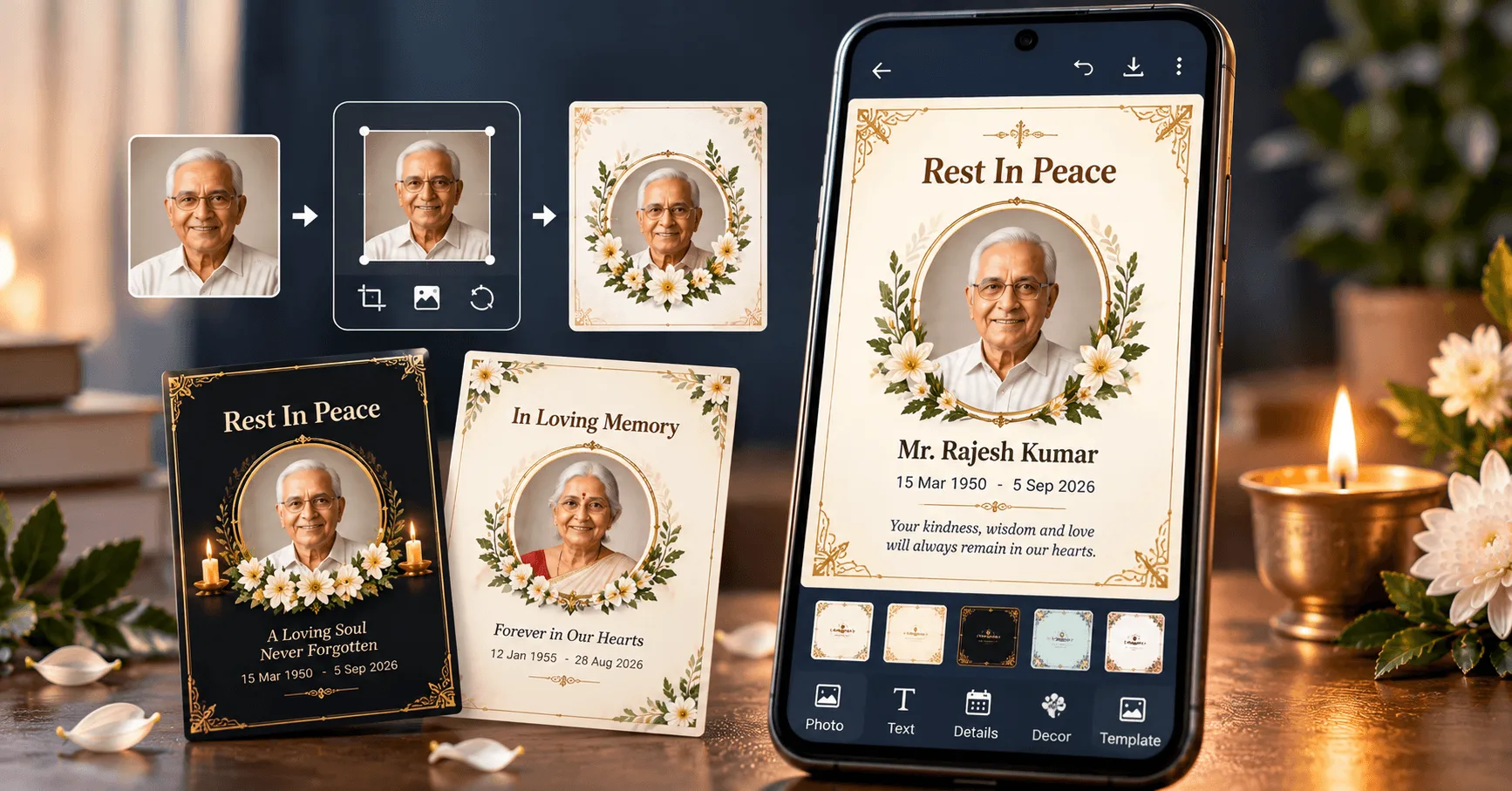
A RIP card is a simple and respectful way to remember someone who has passed away and share their memory with family members, friends, and relatives. A well-designed Rest in Peace card can include the person's photograph, full name, dates, a short remembrance message, and other important details.
Today, you do not need advanced graphic design skills to create a memorial or RIP card. With a mobile phone and a suitable RIP card maker, you can choose a design, add a photo, enter personal information, and prepare a card that is ready to share digitally.
In this guide, we will explain how to make a RIP card on Android, what information to include, how to choose the right photograph and layout, and how to create a respectful design for remembering a loved one.
Application
Shradhanjali Card Maker
Category
RIP Card
Reading Time
8–10 Minutes
Difficulty
Beginner
What Is a RIP Card?
A RIP card, short for "Rest in Peace" card, is a memorial design created to remember a person who has passed away. It can contain a photograph, name, dates, a condolence or remembrance message, and information that the family wants to share.
RIP cards are commonly used as digital memorial cards and may be shared with relatives and friends through messaging applications or social platforms. Depending on the purpose, a RIP card can also be designed as a tribute card, memorial card, condolence card, or Shradhanjali card.
RIP Memorial Card
Focuses on remembering the person with their photograph, name, dates, and a short Rest in Peace message.
Tribute Card
Gives more space to a personal remembrance message or tribute while keeping the photograph prominent.
Condolence Card
Can combine the person's details with a respectful sympathy or condolence message for family and friends.
Shradhanjali Card
Can be created as a regional-language memorial card for sharing remembrance and ceremony information.
What Information Should Be Included on a RIP Card?
A RIP card should contain enough information to identify and remember the person without making the design unnecessarily crowded. The exact details can vary depending on the family's preference and the purpose of the card.
1. Photograph
Add a clear and respectful photograph that represents the person being remembered.
2. Full Name
Display the person's name clearly so that family members and friends can immediately identify the memorial card.
3. Important Dates
Birth and passing dates can be included when the family wants the card to preserve these details.
4. RIP or Remembrance Message
Add a short Rest in Peace message or another heartfelt remembrance message suitable for the occasion.
How to Choose the Best Photo for a RIP Card
The photograph is usually the most important visual element of a RIP card. A clear and suitable photo can make the memorial design more personal while helping friends and relatives recognize the person being remembered.
- Choose a clear photograph with the person's face visible.
- Prefer a photograph that represents the person naturally and respectfully.
- Avoid heavily blurred or extremely low-resolution photographs when a better option is available.
- Check the crop before saving the final design.
- Make sure the selected photo does not get covered by text or decorative elements.
If the card will also be printed, using a higher-resolution source image can help preserve better detail in the final output.
Choosing a Respectful RIP Card Design
The design should support the purpose of remembrance. A clean layout generally works better than one with too many decorative elements, especially when the card includes a photograph and several pieces of personal information.
Simple Design
Focuses on the photograph, name, dates, and a short remembrance message.
Photo-Focused Design
Gives the person's photograph more visual space while keeping supporting information minimal.
Memorial Information Design
Provides additional space for family, prayer meeting, or other ceremony details when required.
How to Make a RIP Card on Android
Creating a RIP card on Android can be straightforward when you use a dedicated card-making app. The basic process involves selecting a suitable design, adding the person's photograph, entering their details, and reviewing the final card before saving or sharing it.
Step 1: Choose a Suitable Design
Start with a simple RIP, memorial, tribute, or condolence design that matches the purpose of the card. Choose a layout with enough space for the photograph and important details.
Step 2: Add the Photograph
Select a clear photograph from your phone and position it correctly inside the selected photo frame or layout.
Step 3: Enter the Name and Dates
Add the person's full name and important dates carefully. Review spelling and numbers before moving to the next step.
Step 4: Add a RIP Message
Add a short and respectful Rest in Peace or remembrance message. Keep the wording appropriate for the person and family.
Add Personal Details to Make the Card Meaningful
Personal information can make a RIP card more useful and meaningful. However, the amount of information should be balanced with the available space in the design.
Person's Full Name
The full name should be clearly visible and should normally receive stronger visual emphasis than secondary information.
Birth and Passing Dates
Dates can help identify the person and provide a simple way to preserve their memory. Check all dates carefully before publishing or sharing the card.
Family or Community Details
Depending on the purpose of the card, you may include family information, village, city, or other details that help recipients understand who the memorial card represents.
Prayer Meeting or Ceremony Details
If the card is also being used to communicate information about a prayer meeting or memorial gathering, include the date, time, venue, and other relevant information clearly.
RIP Card Background and Photo Frame Ideas
The background and photo frame should complement the photograph rather than compete with it. Simple visual elements generally work well for memorial designs.
Minimal Light Background
A light and clean background can provide a calm appearance while keeping the photograph and text easy to see.
Soft Neutral Background
Neutral tones can create a balanced memorial appearance without distracting from the main information.
Subtle Dark Background
A restrained dark design can create a formal appearance when paired with high-contrast readable text.
For photo frames, a simple border, classic memorial frame, or subtle rounded frame can work well. Avoid overly decorative frames that cover important parts of the photograph.
How to Write a Respectful RIP Message
The message on a RIP card should be short, sincere, and appropriate for the situation. You do not need a long paragraph to express remembrance. A few carefully chosen words can be enough.
Keep the Message Simple
Short expressions of remembrance can work better than filling the card with large amounts of text.
Choose Respectful Language
Use wording that communicates respect, remembrance, sympathy, or peace according to the family's preferences.
Match the Language to the Audience
English, Hindi, Gujarati, Marathi, or another familiar language can be used depending on who will receive the card.
RIP Card vs Shradhanjali Card vs Memorial Card
These terms are often used for similar remembrance purposes, but the wording and presentation can vary depending on the family, region, and occasion.
| Card Type | Main Purpose | Common Content |
|---|---|---|
| RIP Card | Rest in Peace remembrance | Photo, name, dates, RIP message |
| Shradhanjali Card | Tribute and remembrance | Photo, name, message, ceremony details |
| Memorial Card | Remembering a loved one | Photo, personal details, tribute message |
| Condolence Card | Expressing sympathy and respect | Photo, condolence message, family details |
| Tribute Card | Personal remembrance | Photo, tribute message, dates |
RIP Card Designs in Gujarati, Hindi and Marathi
Regional-language RIP and remembrance cards can make the message more familiar to family members and friends. The design can remain the same while the wording is adapted to the preferred language.
Gujarati RIP Card
A Gujarati RIP card can include Gujarati remembrance wording along with the person's photo, name, dates, and relevant ceremony details. Depending on the occasion, terms such as શ્રદ્ધાંજલિ કાર્ડ or બેસણું કાર્ડ may also be appropriate.
Hindi RIP Card
A Hindi memorial design can use श्रद्धांजलि, शोक संदेश, or another respectful expression selected by the family. Make sure Devanagari text remains clear and readable.
Marathi RIP Card
A Marathi RIP card can combine the person's photograph and personal details with a suitable Marathi remembrance message. Keep the layout simple so the message remains easy to read.
How to Make a Professional RIP Card on Mobile
A professional RIP card does not require a complicated design. The most important elements are a suitable photograph, accurate personal details, readable text, and a calm visual layout. When these elements are balanced, the card can communicate remembrance clearly and respectfully.
Use a High-Quality Photograph
Select the clearest suitable photograph available and position it carefully within the selected frame.
Keep Important Text Visible
The name, dates, and remembrance message should remain clearly visible and should not overlap the photograph or decorative elements.
Maintain Visual Balance
Leave enough space between different sections instead of filling the entire card with text and decorations.
Review Before Sharing
Carefully check spelling, names, dates, photographs, and other details before saving or sharing the final design.
Common Mistakes to Avoid When Making a RIP Card
Because a RIP card contains sensitive personal information, it is worth spending a few extra minutes checking the finished design before it is shared.
| Common Mistake | Possible Problem | Better Approach |
|---|---|---|
| Using a blurry photograph | The person's face may not be clearly visible. | Choose the clearest suitable photo available. |
| Too much decoration | The main information can become difficult to notice. | Use simple and restrained design elements. |
| Very small text | Names and dates may be difficult to read on mobile. | Use readable font sizes and sufficient contrast. |
| Incorrect name or date | Personal information may be inaccurate. | Proofread all details before sharing. |
| Poor text contrast | Important information may blend into the background. | Choose a background and text combination with clear contrast. |
How to Prepare a RIP Card for WhatsApp Sharing
Many people create memorial cards specifically to share with family and friends through messaging platforms. Before sharing a RIP card on WhatsApp, check how the complete image looks on a smartphone screen.
- Make sure the photograph is clearly visible.
- Check that the person's name and dates can be read without zooming.
- Keep the remembrance message short enough to remain readable.
- Review the final image for spelling and personal information.
- Confirm that the final saved image has no unwanted watermark or editing element.
A clean, high-quality image with a balanced layout is generally easier for recipients to view and understand when shared digitally.
What to Check Before Sharing a RIP Card
Frequently Asked Questions
Conclusion
Making a RIP card with a photo, name, and personal details can be a simple way to create a respectful digital remembrance for a loved one. The most important part is not the amount of decoration, but the clarity, accuracy, and dignity of the final design.
Choose a suitable photograph, keep the layout balanced, use readable text, verify every personal detail, and select a meaningful Rest in Peace message. With a mobile RIP card maker, these steps can be completed conveniently on Android.