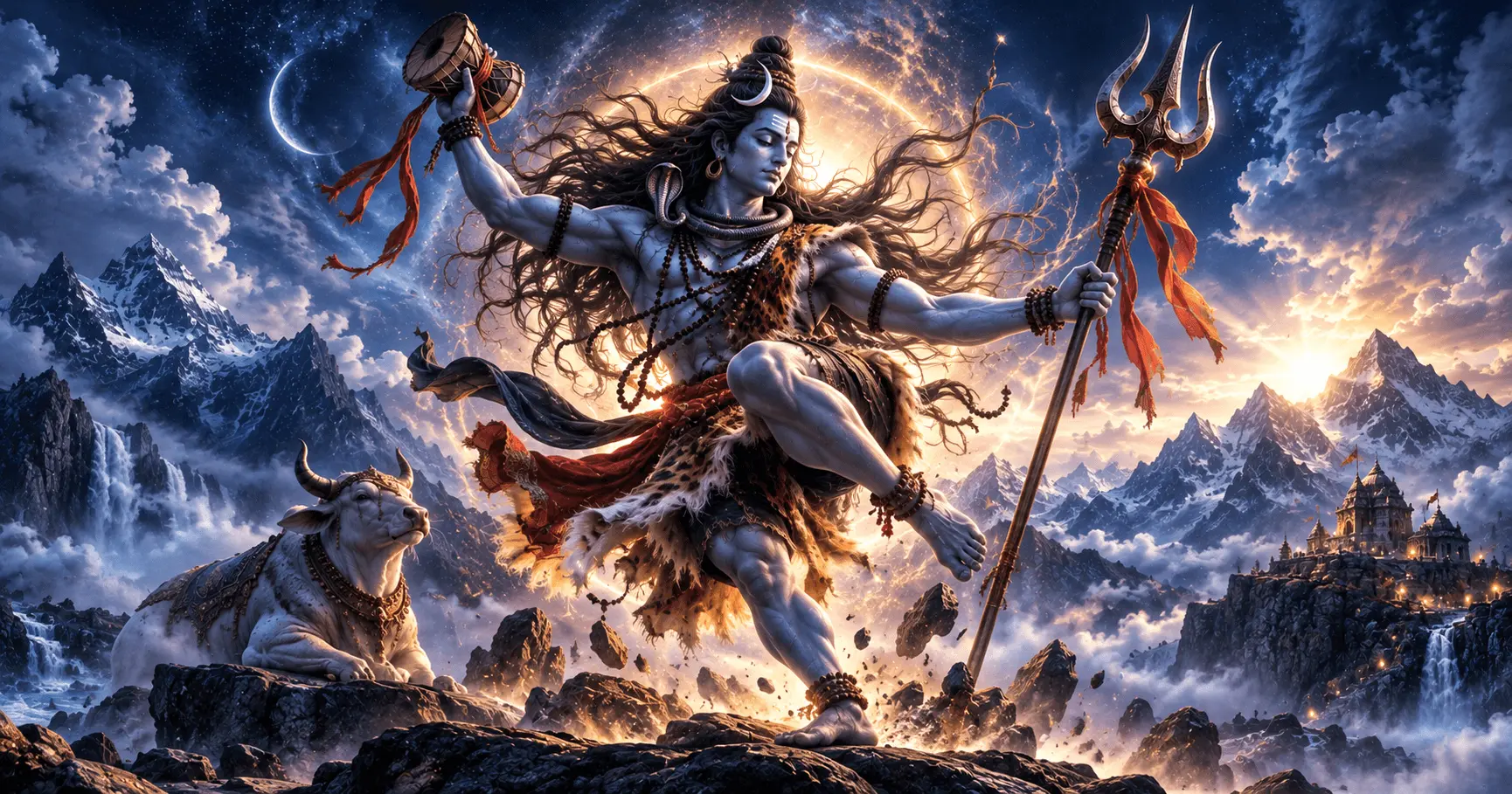
Shiv Tandav is one of the most powerful and visually expressive themes associated with Lord Shiva. Its imagery often represents strength, divine energy, transformation, movement, and devotion. For Android users who want a more powerful devotional look, Shiv Tandav inspired wallpapers can bring this atmosphere to the home or lock screen.
A good Shiv Tandav wallpaper can combine Lord Shiva with dramatic poses, Trishul, Damru, flowing hair, cosmic surroundings, Mount Kailash, and other devotional elements. The right design depends on whether you prefer a powerful artistic scene or a calm devotional composition.
Application
Mahadev HD Wallpaper
Category
Collection
Reading Time
8–10 Minutes
Difficulty
Beginner
What Are Shiv Tandav Inspired Wallpapers?
Shiv Tandav inspired wallpapers are devotional backgrounds based on the powerful artistic representation of Lord Shiva associated with Tandav. Unlike simple portrait wallpapers, these designs often focus on movement, energy, dramatic surroundings, and symbolic elements connected with Shiva.
The visual style can range from highly detailed digital artwork to traditional devotional illustrations. Some wallpapers emphasize a dynamic Tandav pose, while others use Shiva's silhouette, flowing hair, Trishul, Damru, flames, clouds, or cosmic scenery to create a powerful atmosphere.
Common Visual Elements
- Lord Shiva in a dynamic Tandav-inspired pose.
- Trishul and Damru as devotional symbols.
- Flowing hair and dramatic movement.
- Mountains, clouds, cosmic backgrounds, or divine light.
- Powerful lighting and artistic devotional compositions.
Why Choose a Shiv Tandav Wallpaper?
A wallpaper can change the visual character of an Android home or lock screen. Shiv Tandav inspired designs are particularly suitable for users who prefer a bold and energetic Mahadev theme rather than a minimal portrait.
The combination of devotional imagery and dramatic composition can create a strong visual identity while keeping Lord Shiva at the center of the design. A suitable wallpaper can also complement widgets and app icons when the composition leaves enough clear space around the main subject.
Powerful Look
Dynamic Shiva artwork can give your Android screen a bold and energetic devotional appearance.
Devotional Theme
Tandav-inspired artwork keeps Mahadev and related devotional symbolism at the center of the visual design.
Unique Style
Dramatic poses, cosmic backgrounds, and artistic lighting can create a distinctive wallpaper compared with simple portraits.
Popular Shiv Tandav Wallpaper Themes
There are many ways to interpret a Shiv Tandav inspired wallpaper. Choosing a theme first can make it easier to find a design that matches your personal preference and Android screen layout.
Dynamic Tandav Pose
A powerful depiction of Lord Shiva in an expressive Tandav-inspired pose can create a dramatic and energetic home screen.
Shiva With Trishul
A composition featuring Lord Shiva and the Trishul can provide a strong symbolic focus while keeping the design visually recognizable.
Cosmic Mahadev
Cosmic backgrounds, stars, clouds, and divine lighting can create an artistic interpretation of Shiva surrounded by celestial energy.
Mount Kailash Theme
A mountain setting can provide a peaceful devotional environment while retaining the powerful presence of Mahadev.
How to Choose the Right Wallpaper for Android
The best wallpaper is not always the most detailed one. Screen size, resolution, icon placement, brightness, and personal preference can all affect how the design looks after it is applied.
For a home screen, consider whether the main subject remains visible behind app icons and widgets. For a lock screen, check whether the clock and notifications cover important parts of the artwork.
- Choose an image with suitable resolution for your display.
- Check where the main subject is positioned.
- Avoid designs with important details directly behind icons.
- Consider darker designs if you prefer a less distracting screen.
- Preview the wallpaper before applying it to both home and lock screens.
Shiv Tandav Wallpapers With Trishul and Damru
Trishul and Damru are two recognizable symbols commonly associated with Lord Shiva and can add a strong devotional identity to a wallpaper. When combined with Tandav-inspired artwork, they can create a visually powerful composition without requiring excessive decoration.
Some designs place the Trishul prominently beside Shiva, while others use the Damru as a smaller supporting element. Choose a composition where these symbols complement the main artwork instead of covering important details.
Trishul Focus
A prominent Trishul can provide a strong visual anchor and reinforce the Mahadev theme.
Damru Details
A Damru can be incorporated as a subtle devotional detail within the overall Tandav-inspired composition.
Powerful Mahadev Wallpapers With Dynamic Artwork
Dynamic artwork can make a Shiv Tandav wallpaper feel energetic and dramatic. Flowing hair, expressive movement, atmospheric clouds, divine light, and strong poses can all contribute to this visual style.
When selecting a dynamic design, look for a clear focal point. Too many visual effects can make the wallpaper difficult to use behind Android icons and widgets. A balanced composition usually provides a better everyday experience.
Elements That Create a Dynamic Look
- Expressive Shiva pose.
- Flowing hair and clothing.
- Dramatic clouds and atmospheric effects.
- Strong directional lighting.
- Balanced movement around the main subject.
Dark Shiv Tandav Wallpapers for Android
Dark Mahadev wallpapers can create a dramatic and focused appearance on an Android screen. Black, deep blue, charcoal, and other darker backgrounds can make bright Shiva artwork and devotional symbols stand out.
A darker composition can also make app icons easier to distinguish when the background has enough contrast. However, the artwork should still contain sufficient detail to remain visible in different lighting conditions.
Dark Cosmic Backgrounds
Deep space-inspired backgrounds can provide a dramatic setting for Tandav-inspired Shiva artwork.
Silhouette Designs
A Shiva silhouette with controlled lighting can create a simpler but powerful devotional wallpaper.
Shiv Tandav Wallpapers for Lock Screens
A lock-screen wallpaper has different requirements from a home-screen wallpaper because Android may place the clock, notifications, and other interface elements over the image.
Choose a design where the main Shiva artwork remains visible even after the image is cropped. Keeping important details away from the top and central notification areas can help preserve the visual composition.
- Check the position of the Android clock.
- Keep important artwork away from notification areas.
- Choose an image with enough space around the main subject.
- Preview the final crop before applying it.
- Check the wallpaper on your actual device rather than relying only on the original image.
HD Resolution and Image Quality Matter
A high-resolution image can preserve more detail when displayed on a modern Android screen. This is especially important for Shiv Tandav artwork because fine details such as facial features, ornaments, Trishul, Damru, and background effects can lose clarity when a low-quality image is enlarged.
Select a wallpaper with enough resolution for your device and preview it before applying it. Avoid images that already appear blurry, compressed, or pixelated.
HD Wallpaper Checklist
- Use a high-resolution original whenever possible.
- Check facial and symbolic details for clarity.
- Avoid visibly pixelated images.
- Make sure the image remains clear after cropping.
- Preview the final wallpaper on your Android display.
How to Match Wallpaper Colors With Your Android Theme
The colors used in a Shiv Tandav wallpaper can influence the overall appearance of your Android interface. Dark blue, black, grey, gold, orange, red, and cool cosmic tones can all create different visual effects.
If your Android interface uses light icons, a darker background can provide strong contrast. If you use a dark interface, choose a wallpaper where important details remain visible without blending into the background.
Dark Blue
Creates a calm but powerful cosmic appearance around Mahadev artwork.
Black and Grey
Provides a dramatic background that can make brighter devotional details stand out.
Warm Gold and Orange
Adds a more energetic and divine visual character to Tandav-inspired artwork.
Tips for a Respectful Mahadev Wallpaper Selection
Shiv Tandav inspired artwork has a strong devotional character, so choosing a wallpaper can be about more than visual appearance. A balanced and respectful composition can make the wallpaper feel appropriate for everyday use while keeping the focus on Lord Shiva.
Look for artwork that presents Mahadev clearly and avoids unnecessary visual clutter. If the wallpaper contains multiple elements, make sure the main subject remains easy to recognize after Android crops the image.
- Choose artwork that keeps Lord Shiva as the main focus.
- Prefer balanced compositions over excessive visual effects.
- Check the image carefully before applying it.
- Consider whether the design works well with your icons and widgets.
- Choose a style that matches your personal devotional preference.
How to Apply a Shiv Tandav Wallpaper on Android
After selecting a suitable Shiv Tandav inspired image, applying it on Android is generally straightforward. The exact names of menu options can vary between Android devices and manufacturers.
- Open the wallpaper image on your Android device.
- Use the available wallpaper or set-as-wallpaper option.
- Choose whether you want to use it for the home screen, lock screen, or both.
- Adjust the crop and positioning so the main Shiva artwork remains visible.
- Preview the result and apply the wallpaper.
Before Applying
Check the image crop, subject position, brightness, and visibility of important devotional elements. A small adjustment before applying the wallpaper can make a significant difference to the final appearance.
Keep Your Wallpaper Collection Organized
If you enjoy different Mahadev wallpaper styles, keeping your favorite images organized can make it easier to change your Android appearance whenever you want. You can separate wallpapers according to themes such as Tandav, Trishul, Damru, Nandi, Kailash, or peaceful Shiva artwork.
Tandav Collection
Keep powerful and dynamic Shiva artwork together for an energetic wallpaper style.
Symbol Collection
Organize designs featuring Trishul, Damru, Nandi, and other devotional elements.
Peaceful Collection
Keep calmer Shiva and Mount Kailash designs separately for a more minimal devotional appearance.
Shiv Tandav Inspired Wallpapers for Different Android Styles
Different users may prefer different visual approaches. A powerful Tandav scene can work well for someone who enjoys dramatic artwork, while a simplified Shiva composition may be more suitable for users who prefer a clean home screen.
| Wallpaper Style | Best For | Visual Character |
|---|---|---|
| Dynamic Tandav | Bold home screens | Powerful and energetic |
| Trishul and Damru | Devotional themes | Symbolic and focused |
| Cosmic Shiva | Modern Android themes | Dramatic and artistic |
| Mount Kailash | Peaceful screens | Calm and devotional |
Frequently Asked Questions
Conclusion
Shiv Tandav inspired HD wallpapers offer a powerful way to give your Android screen a distinctive Mahadev theme. Dynamic Shiva artwork, Trishul, Damru, cosmic backgrounds, and dramatic lighting can create different visual styles while keeping the devotional focus on Lord Shiva.
For the best result, choose a high-resolution design that fits your screen, keeps the main subject visible, and works well with your Android icons, widgets, clock, and notifications. With the right composition, a Shiv Tandav wallpaper can make your everyday Android experience feel more personal and devotional.
Explore More Mahadev Wallpapers
Discover more Lord Shiva and Mahadev wallpaper styles for Android, including devotional, powerful, peaceful, and artistic HD designs.