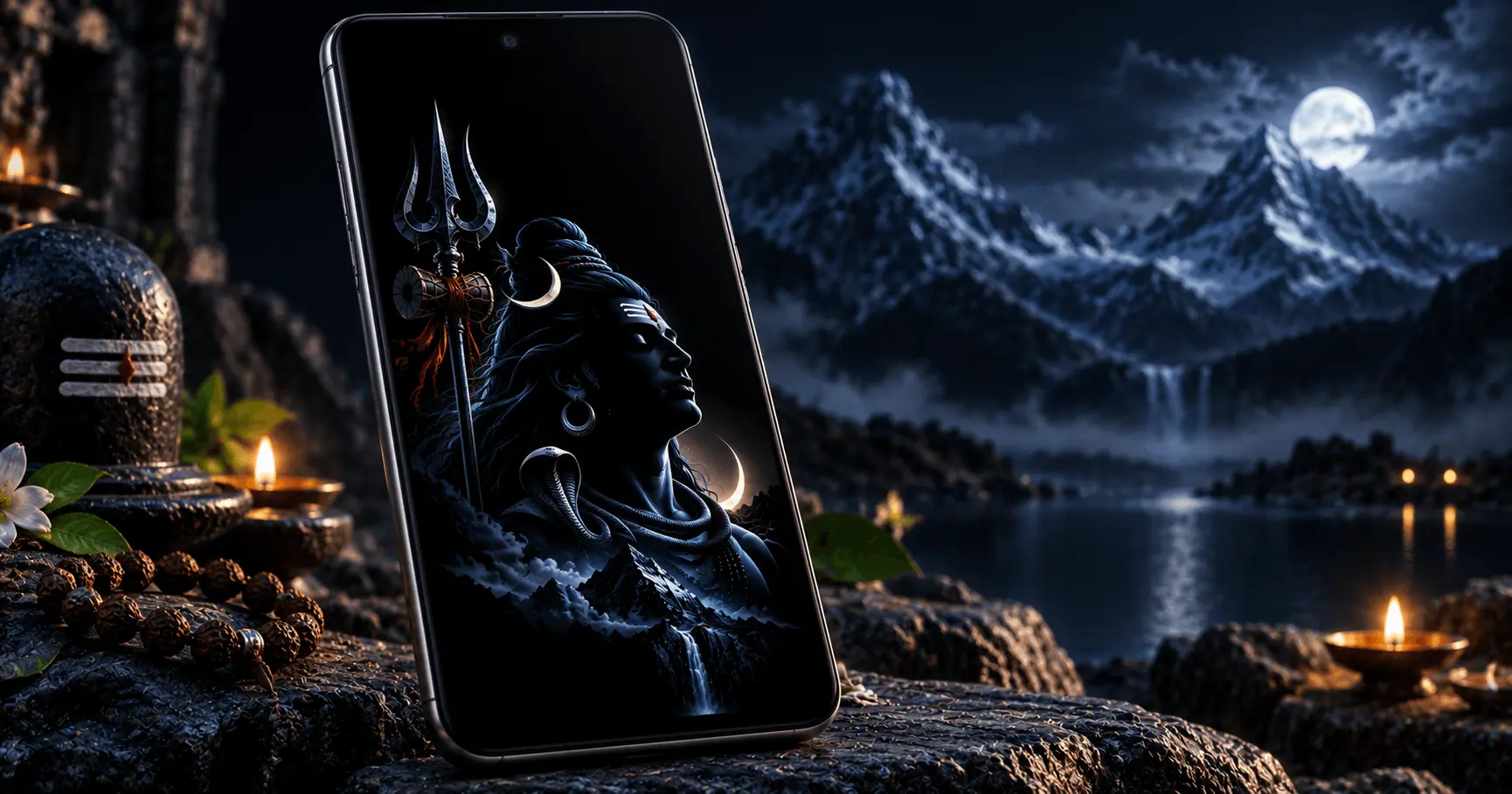
Minimal wallpapers can give your Android home screen a clean and focused appearance while keeping the visual design centered around Mahadev. When these wallpapers use deep black backgrounds and carefully placed artwork, they can also complement the characteristics of AMOLED displays.
Instead of filling the screen with bright colors and detailed backgrounds, a minimal Mahadev wallpaper usually focuses on one strong Shiva-inspired visual element. This makes the wallpaper easier to view behind app icons and keeps the overall phone interface visually balanced.
Application
Mahadev HD Wallpaper
Category
Collection
Reading Time
8–10 Minutes
Difficulty
Beginner
What Makes a Mahadev Wallpaper Minimal?
A minimal Mahadev wallpaper uses a simple visual composition instead of placing many decorative elements across the entire screen. The design may feature a Shiva silhouette, Trishul, Om symbol, meditation pose, or another recognizable devotional element with plenty of empty space around it.
The goal is not to remove the devotional character of the image. Instead, the design keeps the main subject visually clear while reducing unnecessary background details. This can make the wallpaper especially suitable for phones where app icons and widgets occupy a large part of the home screen.
Simple Composition
A limited number of visual elements keeps the wallpaper clean and easy to view behind icons.
Dark Background
Deep black or dark backgrounds can create a strong AMOLED-friendly visual appearance.
Focused Subject
A single Mahadev or Shiva-inspired subject becomes the main visual focus of the screen.
Choose Deep Black Backgrounds for an AMOLED Look
One of the most recognizable characteristics of AMOLED-friendly wallpaper design is the use of deep black areas. On many AMOLED displays, individual pixels can be turned off when displaying true black, which gives black portions of an image a particularly deep appearance.
For this reason, a black Mahadev wallpaper can create a striking contrast between the dark background and lighter Shiva artwork, symbols, or highlights. The result can look especially clean when combined with a simple Android home screen layout.
When choosing a wallpaper, look for designs that use dark areas intentionally rather than simply making the entire image very dark. The Mahadev artwork should remain clear enough to recognize without competing with the background.
Keep the Mahadev Artwork Clear and Uncluttered
A minimal Shiva wallpaper should make the primary subject easy to recognize at a glance. Excessive decorative elements can reduce the clean appearance that makes minimal wallpapers attractive.
Look for images where the main Mahadev artwork has enough space around it. This is particularly useful on the Android home screen because application icons, folders, search bars, and widgets may overlap portions of the wallpaper.
A Good Minimal Design
- Uses one primary Mahadev or Shiva-inspired subject.
- Leaves enough negative space around the artwork.
- Uses a restrained color palette.
- Avoids unnecessary background details.
- Maintains enough contrast for the main subject to remain visible.
Try Different Minimal Mahadev Wallpaper Styles
Minimal Mahadev wallpapers do not all have to use the same visual style. You can choose a design based on the type of devotional artwork, contrast level, and overall appearance you prefer on your Android phone.
A simple black Shiva silhouette may provide a very clean home screen, while a detailed meditation pose can create a stronger devotional focus. Choosing the right style also depends on how many icons and widgets you normally keep on your screen.
Mahadev Silhouette
A Shiva silhouette against a deep dark background creates a simple, high-contrast appearance with minimal visual distractions.
Meditating Shiva
A calm meditation pose can give the home screen a peaceful devotional appearance while keeping the composition simple.
Trishul Design
A minimal Trishul-focused design can work well when you want a recognizable Shiva-inspired symbol without a busy illustration.
Om and Shiva Theme
A restrained Om or Shiva-themed composition can add a devotional touch while preserving a clean AMOLED-style background.
Use High Contrast for Better Visibility
Contrast is important when selecting a minimal Mahadev wallpaper. A dark background combined with carefully placed lighter artwork can help the main subject remain visible without making the screen look overly bright.
High contrast can also make the wallpaper easier to distinguish when the phone is viewed in different lighting conditions. However, extremely bright artwork may compete with application icons, so a balanced design is usually more practical for everyday use.
Look for Balanced Contrast
- Choose a clearly defined Mahadev subject.
- Keep the background substantially darker than the main artwork.
- Avoid excessive bright effects around the entire image.
- Make sure icons remain readable against the wallpaper.
Choose a Wallpaper That Fits Your Home Screen
The best AMOLED wallpaper is not necessarily the darkest image available. It should also work with the way you arrange your Android home screen.
If you use several rows of application icons, a wallpaper with a relatively simple center or lower area may work better. If your home screen is mostly empty, you can choose a design where the Mahadev artwork occupies more of the display.
For Busy Home Screens
Choose simple backgrounds with open areas so application icons and widgets remain easy to see.
For Minimal Home Screens
A stronger Mahadev subject can become the main visual element when fewer icons and widgets are displayed.
Check the Wallpaper Resolution Before Applying It
A high-quality image can make a noticeable difference on modern Android phones. Before setting a Mahadev wallpaper, check that the image has enough resolution for your device's display.
Using a low-resolution image may cause the artwork to appear soft or pixelated after cropping. A suitable HD wallpaper gives you more flexibility when positioning the image and adjusting it to fit the screen.
It is also useful to preview how Android crops the image before applying it permanently. Different devices and launchers may position wallpaper content differently, so make sure the important part of the Mahadev artwork remains visible.
Match the Wallpaper With Dark Android Themes
A minimal Mahadev wallpaper with a black or dark background can pair naturally with Android's dark theme. Matching the wallpaper and interface theme can create a more consistent appearance across the home screen and system interface.
You can also use dark icons or simple widgets where supported. The goal is to maintain enough contrast so that every important interface element remains easy to read.
Use Mahadev Wallpapers Without Overloading the Screen
Minimal design works best when the wallpaper remains a supporting part of the overall interface. Adding too many widgets, shortcuts, or colorful icons can reduce the visual impact of even a carefully designed Mahadev AMOLED wallpaper.
Consider keeping only the applications and widgets you use regularly on the main screen. This allows the devotional artwork to remain visible and preserves the clean appearance of the wallpaper.
Position Minimal Mahadev Wallpapers for the Best Effect
After choosing a minimal Mahadev wallpaper, take a moment to adjust its position before applying it. Android may allow you to move or crop the image so that the main subject appears in a suitable area of the screen.
Try to keep important parts of the artwork away from areas where icons or widgets are placed. A well-positioned wallpaper can look much cleaner without requiring a different image.
Choose Black Mahadev Wallpapers for a Strong AMOLED Style
Black Mahadev wallpapers are a natural choice when you want a strong AMOLED-inspired appearance. Deep backgrounds can make the display look clean while allowing the Shiva artwork to stand out through controlled highlights and contrast.
Look for designs that use black as an intentional part of the composition rather than covering the image with excessive effects. A simple combination of black, gray, white, or a small amount of accent color can produce an elegant result.
Simple Color Combinations
- Black background with a subtle white Shiva silhouette.
- Dark gray artwork with controlled highlights.
- Black and blue tones for a modern devotional appearance.
- Black with a small amount of warm accent color for visual focus.
Try Mahadev Wallpapers With Different Android Layouts
The same wallpaper can look different depending on your launcher, icon arrangement, widgets, and screen layout. Before deciding that a wallpaper does not work, try adjusting the home screen arrangement.
Reducing unnecessary widgets or moving frequently used icons to less important areas of the image can reveal more of the Mahadev artwork. This is especially useful with minimal designs because empty space is an important part of their visual style.
Minimal Icons
Fewer icons allow more of the wallpaper to remain visible.
Simple Widgets
Use only useful widgets so the wallpaper does not become visually crowded.
Dark Interface
A dark system and launcher appearance can complement the wallpaper's overall style.
Use Minimal Mahadev Wallpapers on Lock Screens
A minimal Mahadev wallpaper can also work well as a lock screen background. Because the lock screen usually contains the clock, notifications, and other interface elements, a less crowded image can help maintain readability.
For a lock screen, consider choosing a design with open space around the area where the clock is displayed. This allows the devotional artwork and lock screen information to remain visually separate.
Keep Your Mahadev Wallpaper Collection Organized
If you regularly change wallpapers, keeping your favorite Mahadev images organized can make it easier to find the right design later. You can create a dedicated folder for Shiva and Mahadev wallpapers and separate them by style if your collection becomes large.
For example, you could keep AMOLED, meditation, Trishul, black, and festival-themed designs in separate groups. A simple organization method makes it easier to switch between wallpapers without searching through unrelated images.
When to Choose a Minimal Mahadev Wallpaper
A minimal Mahadev wallpaper is a good choice when you want your Android display to look devotional without becoming visually busy. It can be particularly suitable for users who prefer dark themes, simple home screens, and strong contrast.
A Minimal Wallpaper May Be Right for You If:
- You prefer clean and uncluttered home screens.
- You use Android's dark theme.
- You like black or deep-colored wallpapers.
- You want Mahadev artwork to remain the main visual focus.
- You prefer wallpapers that work well behind app icons and widgets.
Frequently Asked Questions
Conclusion
Minimal Mahadev wallpapers can give an Android phone a clean devotional appearance while working particularly well with dark and AMOLED-style displays. Deep backgrounds, simple Shiva artwork, balanced contrast, and enough empty space can help create an attractive home screen without unnecessary visual clutter.
Whether you prefer a Mahadev silhouette, meditating Shiva, Trishul design, or another simple devotional composition, choose a high-quality wallpaper that fits your screen layout and personal style. With the right image and a simple home screen arrangement, your Android display can remain both meaningful and visually elegant.