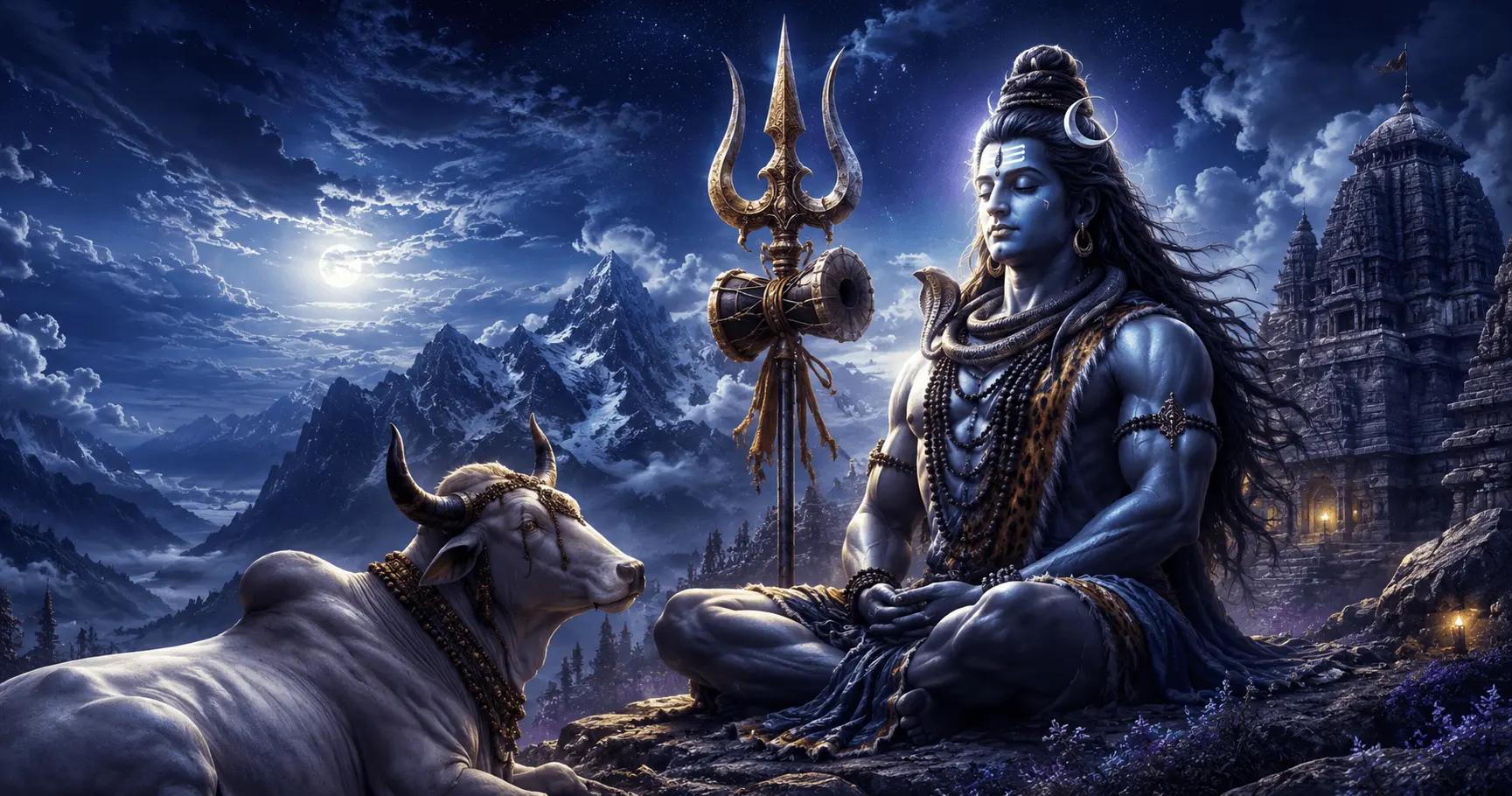
Discover powerful Mahakal wallpapers featuring the Trishul, Damru, Nandi, and other iconic devotional elements. Explore different Mahadev wallpaper styles and learn how to choose a high-quality design for your Android home screen or lock screen.
Discover the Power of Mahakal-Inspired Wallpapers
Mahakal, a revered form of Lord Shiva, is represented in devotional artwork through powerful symbols, peaceful expressions, sacred surroundings, and traditional elements. Among the most recognizable symbols are the Trishul, Damru, and Nandi.
These elements can transform a simple mobile background into a meaningful devotional composition. A Mahakal wallpaper may focus on Shiva himself, highlight the Trishul, incorporate the Damru, or place Nandi within a peaceful temple or Himalayan setting.
For Android users, the visual quality of a wallpaper is only part of the experience. Resolution, composition, contrast, subject placement, and compatibility with home-screen icons can all affect how the final wallpaper looks.
This collection explores different Mahakal wallpapers with Trishul, Damru and Nandi, helping you understand the visual meaning of these elements and choose a design that works beautifully on your Android device.
Mahadev HD Wallpaper
Collection
10–12 Minutes
Beginner
Mahakal Wallpapers Featuring the Trishul
The Trishul is one of the most recognizable symbols associated with Lord Shiva. In devotional wallpaper artwork, it can appear beside Mahakal, behind the main figure, or as the central visual element of a minimalist composition.
A Trishul-focused wallpaper can create a strong and focused appearance without requiring a highly detailed background. This makes the style particularly useful for users who want a devotional design that remains visually clear behind Android application icons.
Trishul Focus
Places the sacred Trishul prominently within a clean and powerful composition.
Mahakal + Trishul
Combines the main Mahadev figure with the Trishul as a supporting devotional element.
Minimal Trishul
Uses a simpler composition for a clean Android home-screen appearance.
Mahakal Wallpapers with the Damru
The Damru is another familiar devotional element associated with Lord Shiva. In wallpaper artwork, it can be presented naturally alongside Mahakal or incorporated into a detailed traditional composition.
Damru-focused designs can add visual interest without making the wallpaper feel overly complicated. When combined with warm golden lighting, traditional ornaments, or a subtle temple background, the Damru can become an important part of the devotional atmosphere.
Mahakal Wallpapers Featuring Nandi
Nandi is a familiar devotional presence in artwork connected with Lord Shiva. Including Nandi in a Mahakal wallpaper can create a more complete temple-inspired or devotional scene.
Nandi may be shown in the foreground with Mahakal in the background, positioned near a temple setting, or integrated into a peaceful Himalayan composition. These layouts are particularly suitable for users who prefer scenic and detailed devotional wallpapers.
| Composition | Visual Effect |
|---|---|
| Nandi Foreground | Creates depth while keeping the devotional setting prominent. |
| Mahakal + Nandi | Creates a balanced devotional composition featuring both subjects. |
| Temple Setting | Adds traditional architectural atmosphere. |
| Himalayan Setting | Creates a peaceful natural devotional scene. |
Trishul, Damru and Nandi Together
Combining the Trishul, Damru, and Nandi can create a richer Mahakal wallpaper composition. The key is to establish a clear visual hierarchy so that the artwork does not become overcrowded.
Mahakal can remain the primary focal point, while the Trishul and Damru support the central figure and Nandi adds depth to the surrounding devotional environment.
- Mahakal: Primary visual focus.
- Trishul: Strong secondary symbolic element.
- Damru: Supporting traditional detail.
- Nandi: Environmental and devotional supporting subject.
Popular Mahakal Wallpaper Styles
Different artistic treatments can give the same devotional symbols a completely different appearance. Choosing the right style depends on whether you want a powerful, peaceful, traditional, scenic, or minimalist phone background.
Traditional Devotional
Detailed ornaments, sacred symbols, temple surroundings, and traditional visual elements.
Himalayan Mahakal
Mahadev combined with mountains, mist, clouds, and peaceful natural surroundings.
Trishul-Focused
A strong symbolic composition centered around the Trishul with minimal distractions.
Dark Devotional
Deep blue, black, and violet tones with controlled highlights and strong contrast.
Explore More Mahakal Wallpaper Ideas
Part 2 continues with Mahakal color combinations, temple-inspired designs, Himalayan scenes, minimalist wallpapers, HD and 4K quality considerations, and choosing the right composition for Android screens.
Powerful Color Combinations for Mahakal Wallpapers
Color plays an important role in the overall appearance of a Mahakal wallpaper. The right combination can make the Trishul, Damru, Nandi, and Mahadev figure stand out while keeping the composition balanced on an Android screen.
Darker palettes can create a powerful and dramatic look, while warmer golden and saffron tones can give a traditional devotional feeling. Blue and purple combinations can also work well with Himalayan or spiritual backgrounds.
| Color Combination | Overall Appearance | Suitable Style |
|---|---|---|
| Deep Blue + Black | Powerful and dramatic | Dark Mahakal wallpapers |
| Blue + Gold | Rich and devotional | Traditional artwork |
| Saffron + Gold | Warm and spiritual | Temple-inspired designs |
| Purple + Blue | Mystical and atmospheric | Artistic Mahakal scenes |
| Grey + White | Calm and minimal | Simple devotional wallpapers |
Temple-Inspired Mahakal Wallpapers
Temple-inspired compositions can create a strong devotional atmosphere by combining Mahakal with traditional architecture, lamps, stone textures, bells, and other subtle environmental details.
These wallpapers can be especially effective when the temple surroundings are kept slightly softer than the main subject. This gives the composition depth while preventing the background from competing with Mahadev.
Temple Entrance
Mahakal positioned within or near a traditional temple entrance with subtle architectural detail.
Sacred Interior
A warm devotional setting with controlled lighting and traditional decorative elements.
Temple at Night
Dark surroundings with selective illumination around Mahakal and devotional symbols.
Himalayan Mahakal Wallpapers
Himalayan-inspired Mahakal wallpapers combine the spiritual presence of Lord Shiva with mountains, mist, clouds, snow, rivers, and dramatic natural landscapes.
These designs can provide a sense of scale and peacefulness. A carefully positioned Mahakal figure can remain the focal point while mountains and atmospheric elements create depth behind the subject.
Minimal Mahakal Wallpapers
Minimal Mahakal wallpapers focus on a small number of carefully selected visual elements. Instead of combining Mahadev, Trishul, Damru, Nandi, mountains, temples, and decorative effects in one image, a minimal design may concentrate on one primary symbol or figure.
This approach can be particularly useful for Android home screens because app icons and widgets can remain easier to see against a less detailed background.
Minimal Trishul
A clean Trishul composition with subtle lighting and a simple background.
Minimal Mahadev
A focused Mahadev portrait with limited surrounding detail.
Damru Detail
A symbolic composition centered around the Damru.
Nandi Silhouette
A simple Nandi-focused composition with atmospheric devotional lighting.
HD and 4K Mahakal Wallpapers
High-resolution artwork can preserve more visual detail when displayed on modern smartphones. Fine details such as ornaments, facial features, the Trishul, Damru, Nandi, and environmental textures can benefit from a higher-quality source image.
However, resolution alone does not determine whether a wallpaper will look good. Composition, source quality, aspect ratio, and the way Android scales the image are also important.
| Quality Consideration | What to Look For |
|---|---|
| Sharpness | Clear edges and well-defined devotional details. |
| Facial Detail | Mahadev's facial features should remain clear. |
| Symbol Detail | Trishul and Damru should remain recognizable. |
| Background | Avoid excessive blur, artifacts, or compression. |
| Resolution | Select a source appropriate for the target smartphone display. |
Choosing a Mahakal Wallpaper for Your Android Screen
A wallpaper that looks excellent in a gallery may not always work equally well as a home-screen background. Android icons, widgets, the clock, and notifications can cover portions of the image.
Before applying a Mahakal wallpaper, consider where the important elements are positioned and whether the background provides enough visual space for your screen interface.
Quick Selection Guide
| If You Prefer | Consider |
|---|---|
| Powerful symbolism | Trishul-focused wallpaper |
| Traditional devotional style | Temple-inspired Mahakal artwork |
| Natural scenery | Himalayan Mahakal wallpaper |
| Detailed composition | Mahakal with Trishul, Damru and Nandi |
| Clean home screen | Minimal Mahakal design |
| Dark visual style | Deep blue or black devotional artwork |
Continue Exploring Mahakal Wallpapers
Part 3 will cover lock-screen and home-screen considerations, wallpaper cropping, personalization, quality checks, frequently asked questions, and the final conclusion.
Mahakal Wallpapers for the Lock Screen
A lock-screen wallpaper has fewer app icons than a typical home screen, but the clock, date, and notifications may still cover parts of the artwork. A Mahakal design with a strong central subject can therefore work particularly well when important details are positioned away from common interface areas.
If the wallpaper features Mahadev together with the Trishul, Damru, and Nandi, check the preview carefully. Keeping the face and major devotional symbols visible can make the final lock screen feel more balanced.
- Keep Mahadev's face clearly visible.
- Avoid placing important details directly behind the clock area.
- Check where notifications appear on your device.
- Preview the complete lock screen before applying it.
Mahakal Wallpapers for the Android Home Screen
Home screens require additional consideration because application icons and widgets can cover a large part of the wallpaper. A highly detailed Mahakal scene may look impressive by itself but become difficult to read when icons are placed over it.
For a home screen, wallpapers with controlled background detail and good contrast can provide a cleaner appearance. Minimal Trishul designs, focused Mahadev portraits, and darker compositions can all work well depending on the phone's layout.
Good Choices
- Simple backgrounds
- Clear main subject
- Balanced negative space
- Strong contrast
Things to Avoid
- Excessive background clutter
- Important symbols behind icons
- Very low contrast
- Important details too close to the edges
How to Avoid Cropping Mahakal Wallpapers
Different Android devices can use different screen dimensions and wallpaper behavior. When an image is scaled to fit the display, portions near the edges may be cropped or repositioned.
This is especially important for detailed Mahakal artwork. If the Trishul, Damru, Nandi, or Mahadev's face is positioned too close to an edge, the final wallpaper may lose part of the composition.
Cropping Checklist
- Check the wallpaper dimensions before applying it.
- Keep Mahadev's face away from the extreme edges.
- Leave enough space around the Trishul and Damru.
- Check that Nandi is not cut off by the crop.
- Use your Android wallpaper preview to make the final positioning adjustment.
Personalizing Your Android Screen with Mahakal Wallpapers
A devotional wallpaper can become part of a larger Android personalization setup. Icons, widgets, themes, and the wallpaper should work together rather than compete for attention.
1. Choose a Style
Select traditional, Himalayan, minimalist, Trishul-focused, or dark devotional artwork.
2. Check the Layout
Make sure important artwork does not conflict with icons or widgets.
3. Adjust the Crop
Position the wallpaper so Mahadev and the devotional symbols remain visible.
4. Apply
Confirm the final preview and apply the wallpaper to your preferred screen.
Mahakal Wallpaper Quality Checklist
- ✓ High-resolution image
- ✓ Clear Mahadev details
- ✓ Sharp Trishul and Damru
- ✓ Clearly visible Nandi
- ✓ Good image clarity
- ✓ Suitable aspect ratio
- ✓ Balanced composition
- ✓ Good subject-background contrast
- ✓ Minimal unwanted cropping
- ✓ Suitable for your Android layout
Frequently Asked Questions
Conclusion
Mahakal wallpapers featuring the Trishul, Damru, and Nandi offer a wide range of devotional styles for Android users. You can choose from powerful symbolic compositions, traditional temple scenes, peaceful Himalayan artwork, colorful devotional designs, or clean minimalist layouts.
The best wallpaper is not necessarily the most detailed image. It should also work with your phone's display, wallpaper cropping, icons, widgets, and lock-screen elements.
If you prefer a strong devotional statement, a Mahakal composition with the Trishul and Damru can be an excellent choice. If you prefer a scenic design, adding Nandi and a Himalayan or temple-inspired environment can create greater depth.
Take a moment to preview your chosen wallpaper before applying it. With the right resolution, composition, contrast, and positioning, a Mahakal wallpaper can give your Android screen a distinctive devotional appearance.
Find Your Favorite Mahakal Wallpaper
Explore Mahadev HD wallpapers and personalize your Android screen with powerful devotional artwork.