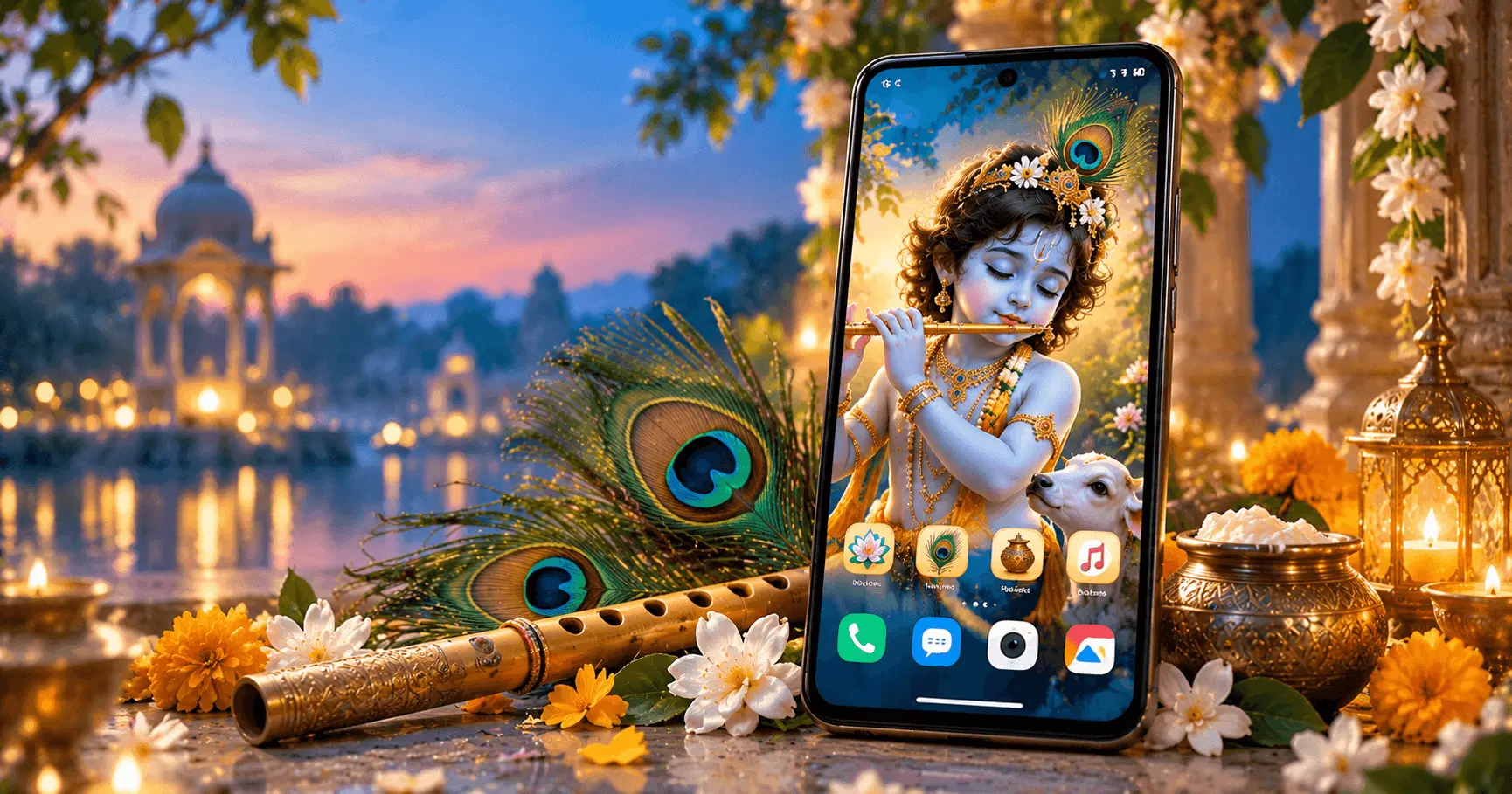
Janmashtami is a special occasion for devotees of Lord Krishna, and your Android home screen can become a simple way to bring that festive feeling into your daily phone experience. A thoughtfully chosen Krishna wallpaper, matching colors, devotional icons, and a clean widget arrangement can create a beautiful home screen without making it difficult to use.
From peaceful Krishna flute artwork to adorable Bal Gopal designs, there are many ways to create a Janmashtami-inspired Android setup. The key is to balance devotional visuals with practical home screen organization so that important apps and information remain easy to access.
Application
Krishna Wallpaper Janmashtami
Category
Festival Guide
Reading Time
8–10 Minutes
Difficulty
Beginner
Why Create a Janmashtami Home Screen?
A home screen is one of the most frequently viewed parts of an Android phone. During Janmashtami, updating it with a Krishna-themed design can add a festive and devotional touch to your everyday device.
You do not need to completely redesign your phone. A suitable wallpaper combined with a few simple visual adjustments can be enough to create a meaningful setup.
- Celebrate Janmashtami with a devotional Krishna theme.
- Give your Android phone a fresh festive appearance.
- Use Krishna artwork that reflects your preferred style.
- Create a cleaner and more coordinated home screen.
- Keep your favorite apps and widgets easy to access.
Choose the Right Krishna Wallpaper
The wallpaper is the most important part of a Janmashtami-inspired home screen. Since the background covers a large part of the display, choose an image that looks attractive while still leaving enough visual space for app icons.
Krishna wallpapers are available in many styles. You can choose peaceful flute artwork, traditional devotional illustrations, colorful Janmashtami scenes, or cute Bal Gopal designs depending on the mood you want.
Flute Theme
Choose peaceful Krishna flute artwork for a calm and devotional home screen.
Bal Gopal Theme
Use a cute Bal Gopal design for a cheerful and family-friendly Janmashtami look.
Traditional Theme
Select detailed devotional artwork inspired by traditional Krishna imagery.
Use a Calm Color Theme
A coordinated color palette can make your Android home screen look more polished. Krishna-themed wallpapers often include shades such as blue, yellow, gold, green, and warm natural tones.
Choose colors that complement the wallpaper rather than competing with it. If the background is already detailed and colorful, simple icons and widgets can help maintain a balanced appearance.
Keep the Visual Balance
Avoid adding too many bright elements over an already detailed Krishna wallpaper. A simpler icon arrangement can allow the devotional artwork to remain the main visual focus.
Keep Important Apps Easy to Find
A beautiful home screen should still be practical. After applying a Janmashtami wallpaper, arrange frequently used applications in locations that are comfortable to reach.
Keep everyday apps such as the phone, messages, camera, browser, or other frequently used applications where you normally expect them. You can move less frequently used apps to another home screen or app folder.
- Keep essential apps on the main home screen.
- Group related apps into folders when useful.
- Avoid covering important parts of the wallpaper with icons.
- Leave some empty space when the wallpaper benefits from it.
Choose Widgets That Match the Wallpaper
Widgets can add useful information to your Android home screen, but too many widgets can hide the Krishna artwork and make the layout feel crowded. For a Janmashtami theme, choose only the widgets that you actually use.
A small clock, weather widget, or calendar can work well when positioned carefully. Consider transparent or minimal widget styles when available so the wallpaper remains visible in the background.
Minimal Clock
A simple clock can provide useful information without taking attention away from Krishna artwork.
Weather Widget
A compact weather widget can add practical information while maintaining a clean home screen.
Create a Krishna Flute Inspired Home Screen
Krishna's flute is one of the most recognizable elements associated with Krishna imagery. A flute-inspired wallpaper can create a peaceful and elegant Janmashtami home screen.
Look for artwork where Krishna and the flute are positioned away from the areas where your most important app icons appear. This makes the wallpaper easier to appreciate while keeping the home screen functional.
Blue and soft natural tones can work particularly well with this style. Keep additional visual elements simple so that the flute and Krishna artwork remain the main focus.
Try a Cute Bal Gopal Home Screen
If you prefer a cheerful and playful appearance, a Bal Gopal wallpaper can be an excellent choice for Janmashtami. Cute Krishna artwork can feature traditional elements such as butter pots, peacock feathers, flute designs, or festive decorations.
Because these wallpapers can contain many colorful details, avoid placing too many icons directly over the main character. A clean arrangement can make the wallpaper look much better.
Keep Bal Gopal Visible
Before finalizing the wallpaper, check where your app icons normally appear. Choose an image composition that keeps Bal Gopal clearly visible instead of covering the main artwork.
Match Your Icons With the Festive Theme
Android icon styles can have a significant effect on the overall appearance of a home screen. If your launcher supports themed icons or icon customization, consider using a simple style that complements your Krishna wallpaper.
Avoid making every element highly decorative. The goal is to create a coordinated appearance rather than compete with the devotional artwork.
- Use simple icons when the wallpaper is detailed.
- Consider themed icons if your Android launcher supports them.
- Keep frequently used icons easy to recognize.
- Maintain enough contrast between icons and the wallpaper.
Use a Matching Lock Screen
A Janmashtami theme does not have to stop at the home screen. You can create a coordinated look by choosing a related Krishna wallpaper for the lock screen.
For example, a peaceful Krishna flute image can be paired with a complementary devotional design on the home screen. Alternatively, you can use different Krishna artwork while keeping similar colors across both screens.
When selecting a lock screen image, make sure important details are not hidden behind the clock, notifications, or other system elements.
Keep the Home Screen Clean for Daily Use
A festival-themed home screen should remain comfortable to use after Janmashtami as well. Avoid filling every available space with shortcuts, widgets, and folders simply to make the screen look complete.
A clean layout often makes devotional artwork more noticeable and gives the phone a more polished appearance. Start with the wallpaper, add only essential apps, and then introduce one or two useful widgets if needed.
A Simple Layout
- Choose a high-quality Krishna wallpaper.
- Position the wallpaper so the main artwork remains visible.
- Keep frequently used apps on the main screen.
- Add only useful widgets.
- Review the final layout and remove unnecessary elements.
Create a Traditional Janmashtami Home Screen
A traditional Krishna theme can give your Android home screen a devotional and festive appearance. Choose artwork that includes familiar elements such as Krishna with a flute, peacock feathers, traditional clothing, flowers, or other Janmashtami-inspired details.
For a balanced design, select a wallpaper with a clear main subject and enough open space for your application icons. This keeps the devotional artwork visible without making the screen difficult to use.
Use Peacock Feather Inspired Colors
The peacock feather is closely associated with Krishna imagery and can provide inspiration for the overall color palette of your Android home screen. Shades of blue, green, and subtle yellow or gold can create a coordinated appearance.
You do not need to change every element of your phone. Simply choosing a Krishna wallpaper that already contains these colors can be enough to create a cohesive Janmashtami theme.
Blue
Works naturally with many Krishna-themed wallpapers and creates a calm visual appearance.
Green
Complements peacock feather artwork and natural devotional backgrounds.
Gold
Adds a subtle festive feeling when used in moderation with Krishna artwork.
Choose Wallpapers for Different Android Screen Sizes
Android phones have different display sizes and aspect ratios, so the same wallpaper may appear differently on different devices. A high-resolution image gives you more flexibility when setting up your home screen.
Before applying a wallpaper, check its preview and adjust the crop if necessary. Make sure the main Krishna artwork is not cut off and that important details remain visible.
- Use a high-resolution image whenever possible.
- Check the wallpaper preview before applying it.
- Avoid cropping the main subject unnecessarily.
- Consider how icons and widgets will appear over the image.
Make Your Janmashtami Home Screen Practical
A festive home screen should still make everyday phone use convenient. After selecting your Krishna wallpaper, spend a few minutes arranging applications and widgets according to your normal habits.
Keep the most frequently used apps within easy reach and move less important shortcuts away from the main screen. If you use folders, give them clear names so that you can find applications quickly.
Quick Organization Checklist
- Keep essential apps on the first screen.
- Remove shortcuts you rarely use.
- Use folders for related applications.
- Keep widgets compact and useful.
- Leave enough space for the Krishna artwork to remain visible.
How to Apply a Janmashtami Wallpaper on Android
Once you have selected your favorite Krishna wallpaper, applying it is usually straightforward. The exact options can vary depending on your Android version and device manufacturer, but the general process is similar.
- Save or download the Krishna wallpaper to your Android device.
- Open the image from your Gallery or Photos application.
- Tap the wallpaper or set-as-wallpaper option.
- Choose the home screen option when available.
- Adjust the image position and crop.
- Apply the wallpaper and review your home screen layout.
If your device provides separate home screen and lock screen options, you can choose whether to use the same Krishna artwork on both screens or create a coordinated pair of wallpapers.
Keep Your Favorite Krishna Wallpapers for Future Festivals
If you enjoy changing your home screen for festivals, keep your favorite Krishna wallpapers in a dedicated folder or album. This makes it easier to reuse them during future Janmashtami celebrations without searching for the images again.
You can also maintain separate collections for different styles, such as Krishna flute wallpapers, Bal Gopal wallpapers, traditional Krishna artwork, and colorful Janmashtami designs.
Refresh Your Home Screen for Janmashtami
Changing your Android home screen for Janmashtami does not require a complete redesign. A new Krishna wallpaper, a cleaner icon arrangement, and one or two useful widgets can create a noticeable festive update.
Take a few minutes to review your existing home screen before applying the new theme. Removing unused shortcuts and unnecessary widgets can make the new Krishna artwork stand out more clearly.
- Replace an old wallpaper with a suitable Krishna design.
- Remove shortcuts that you no longer use.
- Keep only useful widgets.
- Arrange important apps around the main artwork.
- Review the final layout before adding more visual elements.
Respectful Selection of Krishna Wallpapers
When choosing a Janmashtami wallpaper, consider the devotional nature of Krishna imagery. Select artwork that you personally find meaningful and appropriate for your home screen.
High-quality devotional artwork can create a peaceful visual experience without requiring excessive decorative elements. A simple Krishna image can often work better than a heavily crowded design.
Focus on Meaningful Artwork
Choose a Krishna wallpaper based on the style and devotional feeling you prefer rather than selecting an image only because it contains many decorative elements.
Janmashtami Home Screen Ideas at a Glance
| Home Screen Style | Wallpaper Idea | Best For |
|---|---|---|
| Peaceful | Krishna with flute | Simple and calm layouts |
| Cheerful | Cute Bal Gopal | Colorful festive themes |
| Traditional | Devotional Krishna artwork | Classic Janmashtami appearance |
| Elegant | Minimal Krishna artwork | Clean Android home screens |
| Festive | Janmashtami-inspired artwork | Bright celebration themes |
Frequently Asked Questions
Conclusion
A Janmashtami-inspired Android home screen can be simple, beautiful, and practical. Start with a Krishna wallpaper that matches your preferred style, then organize your icons and widgets so the devotional artwork remains visible.
Whether you prefer peaceful Krishna flute artwork, cute Bal Gopal designs, or traditional devotional themes, a carefully selected wallpaper can give your Android phone a special festive appearance for Janmashtami.