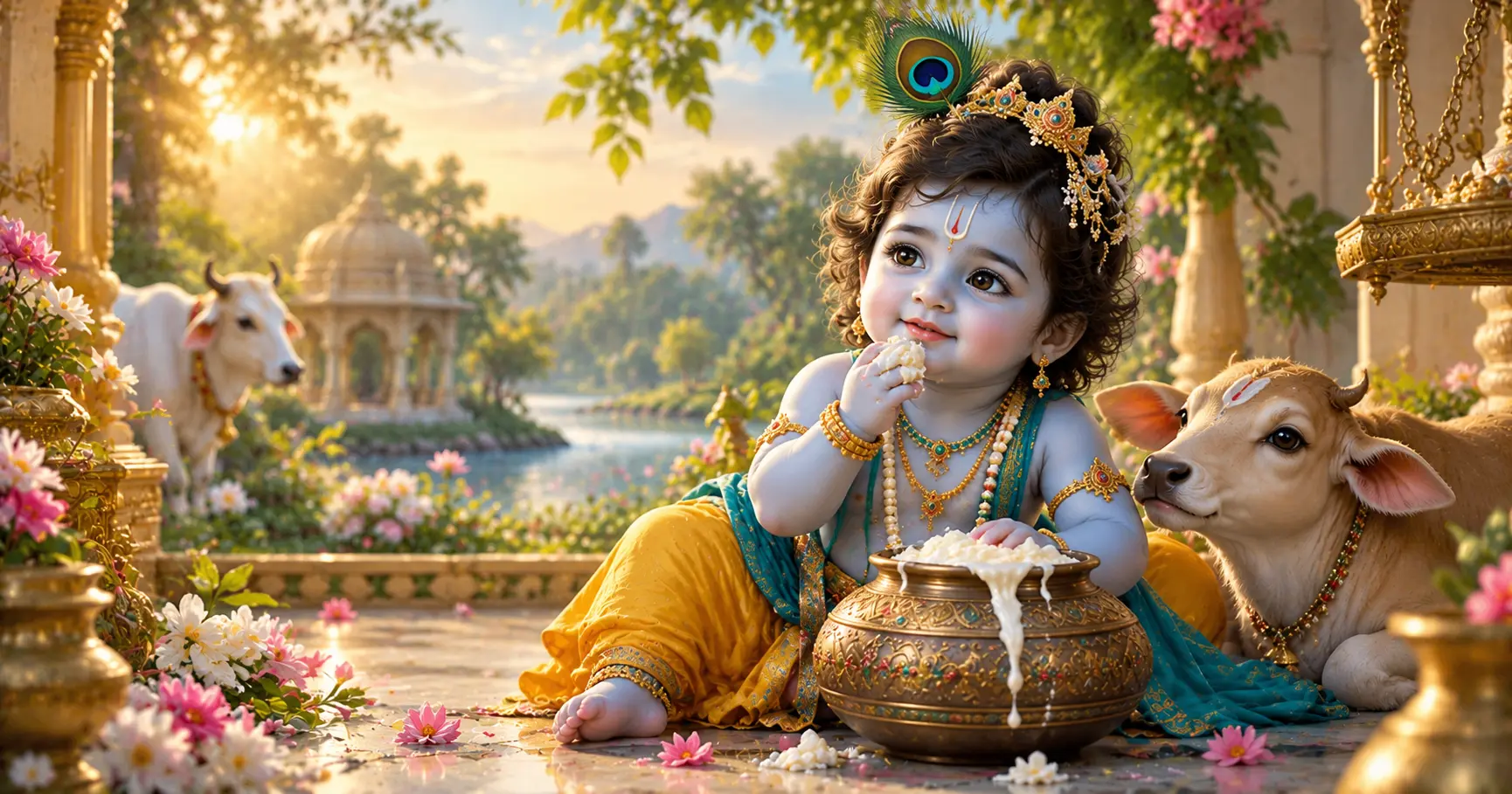
Cute Bal Gopal wallpapers bring a playful and devotional style to Android screens. From adorable child Krishna artwork to traditional Janmashtami scenes, these wallpapers can give your phone a colorful and meaningful personal touch.
Choosing the right Bal Gopal wallpaper is not only about finding a beautiful image. Resolution, composition, colors, subject placement, and compatibility with your Android screen can all affect how the wallpaper looks after it is applied.
Application
Krishna Wallpaper For Janmashtami
Category
Collection
Reading Time
8–10 Minutes
Difficulty
Beginner
Why Choose Cute Bal Gopal Wallpapers?
Bal Gopal wallpapers are based on the child form of Lord Krishna and are commonly represented through playful, colorful, and devotional artwork. Different designs can create different visual moods, making them suitable for users who want something cheerful while keeping a devotional theme.
A cute wallpaper can also make the Android home screen feel more personal. Simple artwork may work well behind app icons, while detailed illustrations can be better suited to a lock screen where fewer elements cover the image.
- Add a playful devotional style to your Android screen.
- Choose from colorful and traditional Krishna artwork.
- Find designs suitable for home screens or lock screens.
- Use different compositions for different screen layouts.
- Select artwork that matches your preferred colors and visual style.
Popular Bal Gopal Wallpaper Themes
Cute Bal Gopal wallpapers can feature many different artistic themes. Some focus on Krishna's playful childhood character, while others combine devotional imagery with colorful backgrounds, flowers, traditional decorations, or festive elements.
Playful Bal Gopal
Cute illustrations showing child Krishna in cheerful and playful poses, often with expressive facial details and colorful clothing.
Makhan Chor Theme
Artwork inspired by the familiar childhood imagery of Krishna with butter pots and other playful devotional elements.
Festive Krishna
Bright designs featuring decorative elements, flowers, traditional colors, and a festive atmosphere suitable for Janmashtami.
Bal Gopal Wallpapers for Home Screens
Home screens usually contain several app icons, widgets, folders, and other elements. Because of this, wallpaper composition becomes especially important. A design with the main Bal Gopal artwork positioned away from busy icon areas can remain easier to appreciate.
For a home screen, consider wallpapers with a balanced background and enough visual space around the main subject. Avoid choosing an extremely detailed image if it makes app labels or widgets difficult to see.
What to Look For
- Clear subject placement.
- Good contrast between artwork and icons.
- Enough empty space for widgets and app shortcuts.
- A resolution suitable for your phone display.
- A background that does not make the home screen feel too crowded.
Bal Gopal Wallpapers for Lock Screens
Lock screens generally have fewer app icons than home screens, giving you more flexibility when selecting a detailed Bal Gopal wallpaper. A portrait with the subject positioned toward the center or lower portion can create a visually balanced result depending on the phone's clock and notification layout.
Before applying a wallpaper, preview how Android places the clock, notifications, and other lock-screen elements. Important parts of the artwork should remain visible instead of being covered by interface elements.
Choose the Right Bal Gopal Wallpaper Style
The best wallpaper style depends on the appearance you want on your Android screen. Cute Bal Gopal artwork is available in colorful, traditional, minimal, festive, and scenic compositions. Each style can create a different look when used as a home screen or lock screen.
Colorful Designs
Bright backgrounds, colorful clothing, flowers, and decorative elements can create a cheerful and vibrant Android screen.
Minimal Designs
Simple backgrounds and limited decorative elements can keep the screen cleaner and make app icons easier to recognize.
Traditional Designs
Traditional artwork can include devotional clothing, ornaments, peacock feathers, butter pots, and other familiar Krishna-inspired elements.
Festive Designs
Festive wallpapers can use flowers, diyas, decorative patterns, and Janmashtami-inspired elements for a celebratory appearance.
Look for High-Resolution Bal Gopal Wallpapers
Image quality is important when choosing a wallpaper for a modern Android phone. A low-resolution image may appear soft or pixelated when it is stretched across a large display.
Choose a high-resolution image that is suitable for your device. The exact resolution requirement depends on your phone's display, so checking the screen specifications can help you select an appropriately detailed image.
Image Quality Checklist
- Choose a clear, high-resolution image.
- Avoid visibly pixelated artwork.
- Check important facial and decorative details.
- Make sure the image remains clear after cropping.
- Preview the wallpaper on your actual Android display before keeping it.
Consider Colors and Screen Contrast
Color selection can significantly affect how a wallpaper looks behind Android icons and widgets. A highly detailed image with many bright colors may compete with interface elements, while a simpler background can make icons easier to distinguish.
Blue, yellow, gold, green, saffron, pink, purple, and other traditional color combinations can work well with Bal Gopal artwork. The important consideration is the overall contrast and balance of the finished screen.
Bright Backgrounds
Bright backgrounds can create a cheerful appearance, but check that app icons and text remain easy to see.
Dark Backgrounds
Darker backgrounds can provide stronger contrast for lighter artwork and Android interface elements.
Pay Attention to Wallpaper Composition
A wallpaper can look attractive as a standalone image but appear different after Android crops and positions it on the screen. The location of the main Bal Gopal artwork therefore matters when choosing an image.
Try to select designs where important details are not too close to the edges. This gives Android more flexibility when fitting the image to the screen and can reduce the chance of important artwork being cropped.
- Keep the main subject clearly visible.
- Avoid placing important details directly at the edges.
- Consider where the clock and notifications appear.
- Check how home-screen icons overlap the artwork.
- Preview the final crop before applying the wallpaper permanently.
Cute Bal Gopal Wallpapers for Janmashtami
Bal Gopal artwork has a natural connection with Janmashtami-themed personalization. During the festival, users may prefer wallpapers with decorative flowers, diyas, traditional patterns, peacock feathers, butter pots, or other festive visual elements.
A Janmashtami wallpaper does not have to be highly detailed. A simple Bal Gopal illustration with a clean festive background can also create a pleasant devotional screen while keeping Android icons visible.
Festive Elements to Consider
- Flowers and floral decorations.
- Traditional diyas and decorative lighting.
- Peacock feathers.
- Butter pots and playful Krishna imagery.
- Traditional colors and festive patterns.
How to Preview a Wallpaper Before Applying It
Previewing a wallpaper before applying it helps you see how the image actually fits your Android display. This is especially useful for detailed Bal Gopal artwork where cropping could hide important parts of the design.
- Open the selected Bal Gopal wallpaper on your Android device.
- Use the wallpaper preview option provided by your device or wallpaper app.
- Check the position of the main artwork after cropping.
- Look at how icons, widgets, the clock, and notifications overlap the image.
- Adjust the position when Android provides suitable positioning controls.
Choose Wallpapers That Match Your Android Layout
Android phones can have different screen sizes, aspect ratios, camera cutouts, icon layouts, and lock-screen interfaces. Because of these differences, the same Bal Gopal wallpaper may look slightly different on two devices.
Choose an image that provides enough space around the main artwork and preview it on your own device. This makes it easier to identify cropping issues before setting the wallpaper.
For Home Screens
Look for balanced backgrounds with enough space for app icons and widgets.
For Lock Screens
Choose artwork that remains visible around the clock, notifications, and other lock-screen elements.
Keep the Wallpaper Easy to View
A wallpaper should complement the Android interface rather than make it difficult to use. If the background contains too many bright colors, patterns, or highly detailed elements, app labels and widgets may become harder to distinguish.
When selecting a cute Bal Gopal wallpaper, consider both the artwork and the practical appearance of your screen. A visually attractive image with reasonable contrast and clear subject placement can work better for everyday use.
- Check icon visibility against the background.
- Avoid excessive detail behind important interface areas.
- Consider the brightness of your display.
- Preview the wallpaper in both normal and dark interface modes when available.
- Choose an image that remains comfortable to look at during regular use.
Keep Your Bal Gopal Wallpaper Collection Organized
If you regularly change wallpapers, keeping your favorite Bal Gopal images organized can make future personalization easier. You can create a dedicated folder for Krishna wallpapers and separate images according to style or occasion.
For example, you could keep cute Bal Gopal designs, Janmashtami wallpapers, minimal Krishna artwork, and festive images in separate folders. A simple organization system makes it easier to find a suitable wallpaper without searching through unrelated images.
Simple Organization Ideas
- Create a dedicated Krishna wallpaper folder.
- Separate festive and everyday wallpapers if needed.
- Remove duplicate or low-quality images.
- Keep high-resolution versions when available.
- Review the collection occasionally and keep only wallpapers you use.
How to Get More From Cute Bal Gopal Wallpapers
Wallpaper personalization can be changed according to your mood, festival, screen layout, or preferred artwork style. Instead of using one image permanently, you can maintain a small collection and select different designs when you want to refresh your Android screen.
For example, a colorful Bal Gopal image can provide a festive appearance, while a simpler design may be more suitable for everyday home-screen use. Keeping several styles available gives you more flexibility without requiring a complicated setup.
Frequently Asked Questions
Conclusion
Cute Bal Gopal wallpapers can give an Android phone a colorful and devotional appearance while allowing you to personalize the home screen or lock screen. The available designs range from playful and colorful artwork to simple, traditional, and festive compositions.
When choosing a wallpaper, consider image quality, screen resolution, composition, colors, contrast, and how Android will crop the image. With a suitable design and a quick preview before applying it, you can create a clean and personalized Krishna-themed Android screen.
Explore More Krishna Wallpapers
Discover more Krishna-themed wallpaper designs and personalize your Android screen with devotional HD artwork.