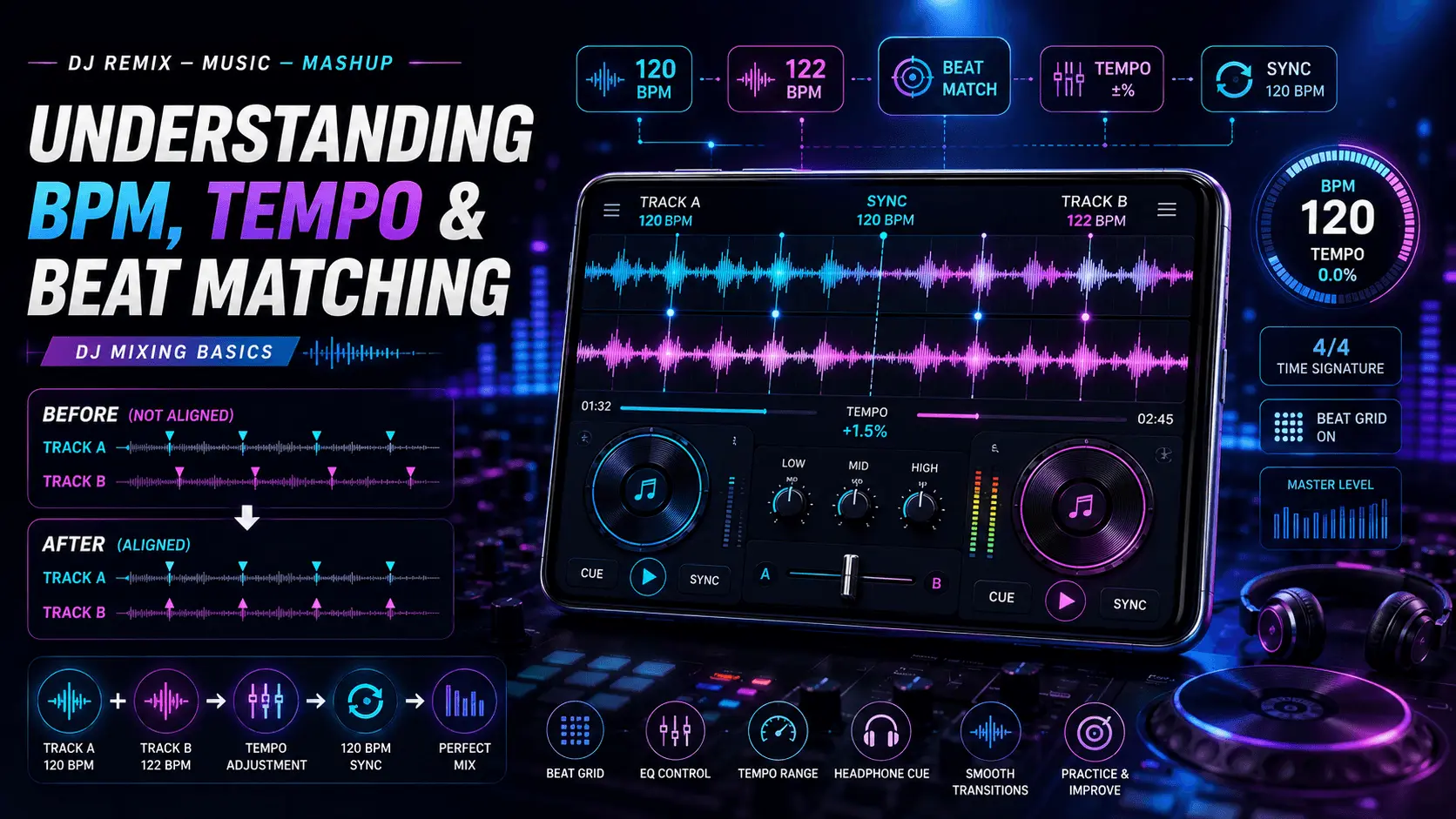
DJ Remix – Music – Mashup
Feature Guide
BPM & Tempo
Beginner
If you are beginning to explore DJ mixing, remixing, or mashups, three terms appear again and again: BPM, tempo, and beat matching. Understanding these concepts makes it much easier to understand why some songs blend naturally while others sound rushed, slow, or out of sync.
BPM means beats per minute. It is a numerical way of describing the rate at which beats occur in a piece of music. Tempo describes the overall speed or pace of the music, while beat matching is the process of aligning the rhythmic beats of two tracks so that they play together more smoothly.
These ideas are closely connected. When two songs have compatible tempos and their beats are properly aligned, a transition can sound much more natural. When their beats drift apart, the result can become noticeably uneven even if both tracks sound fine on their own.
This guide explains BPM, tempo, beat grids, beat matching, tempo adjustment, and practical mixing concepts in a beginner-friendly way. The goal is to give you a clear foundation for understanding how DJ Remix – Music – Mashup features can be used when working with compatible music files.
- What Is BPM in Music?
- Understanding Tempo
- BPM vs Tempo
- Why BPM Matters in DJ Mixing
- What Is Beat Matching?
- Understanding Beats and Bars
- How Beat Matching Works
- Continue: Practical BPM Matching
What Is BPM in Music?
BPM stands for beats per minute. It indicates how many beats occur within one minute of music. For example, a track at 120 BPM has approximately 120 beats occurring in one minute when its beat is counted according to the track's rhythmic structure.
BPM is commonly used in DJ software, music production tools, remix applications, fitness applications, and other systems that need to describe or work with musical tempo.
Think of BPM as a numerical reference for the pace of the beat. If the BPM number increases, the beats occur more frequently. If the BPM number decreases, the beats occur less frequently.
| BPM Range | General Tempo Impression |
|---|---|
| 60–80 BPM | Slow and relaxed feel. |
| 80–100 BPM | Moderate and steady feel. |
| 100–120 BPM | Medium to moderately fast feel. |
| 120–140 BPM | Fast and energetic feel. |
| 140+ BPM | Very fast rhythmic feel in many musical contexts. |
These ranges are only general references. Musical genre, rhythmic structure, arrangement, and how the beat is perceived all influence how fast a track feels.
Understanding Tempo
Tempo refers to the speed or pace of a piece of music. It is closely related to BPM, but the two terms are not exactly the same concept.
BPM provides a numerical measurement, while tempo describes the musical pace. A DJ application can display a BPM value to help you understand the speed of a track and make controlled adjustments when mixing.
Simple Example
Imagine one track at 100 BPM and another at 120 BPM. The second track has a faster beat rate. If you try to mix them without adjusting or accommodating the difference, their beats will not remain aligned for long.
Tempo adjustment can bring compatible tracks closer together so that their rhythmic patterns can be synchronized.
BPM vs Tempo: What Is the Difference?
BPM and tempo are often used together because they describe related aspects of musical speed. However, they are useful in slightly different ways when discussing DJ mixing.
| Term | Meaning | Use in DJ Mixing |
|---|---|---|
| BPM | Beats per minute. | Provides a numerical reference for beat rate. |
| Tempo | The perceived speed or pace of music. | Helps describe how fast or slow a track feels. |
| Beat Matching | Aligning rhythmic beats between tracks. | Helps two compatible tracks play together more smoothly. |
Why BPM Matters in DJ Mixing
BPM gives you a useful starting point when deciding whether two tracks may work together. Tracks with similar BPM values can often require less tempo adjustment than tracks with significantly different BPM values.
For example, mixing a 118 BPM track with a 120 BPM track involves a relatively small tempo difference. A 90 BPM track and a 140 BPM track have a much larger difference and may require a different creative approach.
BPM should not be treated as the only factor when selecting songs. Musical key, arrangement, phrasing, energy, rhythm, and the structure of the tracks can also affect how well they work together.
Similar BPM
Often requires less tempo adjustment and can provide an easier starting point.
Moderate BPM Difference
May require tempo adjustment or a carefully planned transition.
Large BPM Difference
May require a creative transition or a different mixing technique.
What Is Beat Matching?
Beat matching is the process of aligning the beats of two tracks so that their rhythmic pulses occur together. It is one of the fundamental concepts behind smooth DJ transitions.
When two tracks are beat matched, the kick drums, snares, or other major rhythmic elements can fall into a synchronized pattern. When they are not synchronized, you may hear the beats drifting apart or producing an uneven rhythmic effect.
BPM tells you how quickly the beats occur. Beat matching makes the beats of two tracks line up.
Understanding Beats and Bars
To understand beat matching, it helps to understand the basic rhythmic structure of music. A beat is a recurring pulse that helps establish the rhythm. Beats are often grouped into bars or measures according to the musical meter.
In many common dance and popular music arrangements, four beats are grouped into a bar. This is commonly described as a 4/4 time signature, although music can use many other rhythmic structures.
| Concept | Simple Explanation |
|---|---|
| Beat | A recurring rhythmic pulse. |
| Bar | A group of beats organized into a musical measure. |
| Phrase | A larger musical section made from groups of bars. |
| BPM | A numerical indication of the beat rate per minute. |
How Beat Matching Works
The basic idea of beat matching is to make the rhythmic pulses of two tracks occur at the same time. A DJ can use BPM information, waveform displays, beat markers, headphones, or other tools to identify and align the beats.
In a digital DJ workflow, software can make this process easier by analyzing tracks and displaying their estimated BPM and beat positions. However, automatic analysis is not always perfect, so listening and checking the waveform or beat grid can still be useful.
Basic Beat-Matching Sequence
- Identify the BPM of the first track.
- Identify the BPM of the second track.
- Compare the two tempos.
- Adjust the tempo when appropriate.
- Align the beats or beat markers.
- Listen for drift and make small corrections if necessary.
What Is a Beat Grid?
A beat grid is a visual representation of the estimated beat positions in a track. DJ software can use beat grids to help identify where beats occur throughout the waveform.
When the beat grid is correctly aligned with the music, it can make synchronization and beat matching much easier. If the grid is incorrect, however, automatic synchronization can produce unexpected results.
Always listen to the track rather than relying only on an automatically generated BPM or beat grid. Music with unusual timing, tempo changes, live performances, or complex arrangements may require manual checking.
How BPM Differences Affect Mixing
The larger the difference between two BPM values, the more tempo adjustment may be required to bring the tracks together. A small difference is often easier to manage than a large one.
| Track A | Track B | Difference | General Mixing Consideration |
|---|---|---|---|
| 118 BPM | 120 BPM | 2 BPM | Small adjustment. |
| 120 BPM | 126 BPM | 6 BPM | Moderate adjustment. |
| 100 BPM | 120 BPM | 20 BPM | Larger adjustment; transition needs more planning. |
| 90 BPM | 140 BPM | 50 BPM | Large difference; direct beat matching may not be practical. |
Build a Strong Foundation With BPM and Beat Awareness
BPM, tempo, beats, bars, and beat matching are connected concepts. Understanding each one gives you a better foundation for experimenting with transitions and mashups.
The next section covers practical BPM matching, tempo adjustment, beat alignment, phrasing, waveform analysis, transition planning, and common beat-matching mistakes.
How to Match BPM Between Two Songs
Once you understand BPM, the next step is learning how to compare two tracks before mixing them. Start by checking the BPM of both songs and identifying whether their tempos are already close or whether one track needs a significant adjustment.
For example, if one track is 122 BPM and another is 124 BPM, only a small tempo adjustment may be necessary. If the tracks are 100 BPM and 128 BPM, a direct transition may require much more planning.
Simple BPM Matching Process
- Check the BPM of Track A.
- Check the BPM of Track B.
- Compare their tempo difference.
- Decide which track should be adjusted.
- Make a small tempo adjustment.
- Listen and confirm that the beats remain aligned.
What Is Tempo Adjustment?
Tempo adjustment changes the playback speed of a track so that it can better match another track. DJ applications commonly provide a tempo or speed control that lets you increase or decrease the playback tempo.
If Track A is playing at 120 BPM and Track B is at 124 BPM, you can adjust one of the tracks so that their BPM values become closer. The exact method and available controls depend on the application.
| Action | Effect |
|---|---|
| Increase tempo | The track plays faster. |
| Decrease tempo | The track plays slower. |
| Match BPM | Brings two track tempos closer together. |
| Lock tempo/key where supported | Can help preserve the musical pitch while changing tempo. |
BPM Changes and Pitch
Changing playback speed can affect the perceived pitch of a recording depending on how the application processes the audio. This is why some DJ tools provide features designed to change tempo while maintaining the original musical pitch.
The exact result depends on the audio processing method and the amount of tempo adjustment. Small changes may be less noticeable, while larger changes can introduce audible processing artifacts or affect the character of the sound.
Start with small tempo adjustments and listen carefully. Do not assume that a higher BPM automatically produces a better mix.
Aligning the Beats of Two Tracks
Matching BPM is only part of beat matching. Two tracks can have exactly the same BPM and still sound out of sync if their beats are not aligned in time.
Imagine two metronomes ticking at exactly the same speed. If one starts slightly later than the other, they will continue at the same rate but their ticks will not happen together. Beat matching solves this timing difference by aligning the rhythmic points.
Same BPM, Not Aligned
Both tracks have the same tempo, but their beats occur at different moments. The mix can sound rhythmically displaced.
Same BPM, Aligned
Both tracks have compatible tempos and their corresponding beats occur together, creating a more synchronized result.
Use Waveforms to Understand Beat Alignment
Many DJ applications display an audio waveform that represents changes in the sound over time. Larger waveform peaks can often help you identify prominent rhythmic events such as drums or other strong musical elements.
Waveforms can provide a visual reference when aligning tracks, but they should be used together with listening. A visually similar waveform does not always mean that two sections will sound musically compatible.
What to Look For
- Strong recurring waveform peaks.
- Regular rhythmic patterns.
- The beginning of phrases or sections.
- Kick and percussion patterns.
- Whether the visual beat positions match what you hear.
Check the Beat Grid Before Using Automatic Sync
Automatic synchronization can be useful because software can calculate BPM and estimate beat positions. However, the result depends on the accuracy of the track analysis.
If the first beat or beat grid is incorrectly detected, synchronization may not behave as expected. This can happen with tracks containing unusual intros, live timing, tempo changes, silence, or complex rhythmic arrangements.
| Beat Grid Situation | What You May Notice |
|---|---|
| Correct grid | Beat markers remain aligned with the actual rhythm. |
| Incorrect starting point | Sync may begin on the wrong beat. |
| Incorrect BPM analysis | Beat markers can gradually drift away from the music. |
| Changing tempo | A fixed grid may not remain accurate throughout the track. |
Why Musical Phrasing Matters
Even when two tracks have matching BPM and aligned beats, a transition can sound awkward if the musical sections do not line up. This is where phrasing becomes important.
Many songs are structured around repeating groups of bars. Changes such as an intro, verse, chorus, breakdown, or drop often occur at predictable points in the arrangement.
Matching the beginning of a musical phrase can make a transition feel more natural because important musical changes happen together rather than unexpectedly.
Beat matching aligns the rhythm. Phrasing helps align the musical structure.
Plan Your Transition Before Mixing
A good transition starts before the two tracks overlap. Listen to the sections you want to connect and identify where the first track should begin changing and where the second track should enter.
Intro
Often provides a relatively simple section where another track can be introduced.
Breakdown
A less rhythmically dense section can provide space for a creative transition.
Outro
Can provide room to introduce another track as the current track finishes.
Practical BPM Matching Examples
Looking at simple examples can make BPM matching easier to understand.
| Track A | Track B | Possible Approach |
|---|---|---|
| 120 BPM | 121 BPM | Make a very small adjustment and align the beats. |
| 120 BPM | 124 BPM | Adjust one track moderately and check the phrasing. |
| 128 BPM | 126 BPM | Bring the tempos closer and verify beat alignment. |
| 100 BPM | 102 BPM | Small tempo correction may be enough. |
| 90 BPM | 128 BPM | Consider a creative transition rather than forcing a direct tempo match. |
Common Beat Matching Mistakes Beginners Make
Beat matching becomes easier when you understand the mistakes that can make a mix sound unstable or unnatural.
| Mistake | Why It Causes Problems | Better Approach |
|---|---|---|
| Only matching BPM | Same BPM does not guarantee aligned beats. | Align the actual rhythmic beats. |
| Ignoring phrasing | Musical changes may occur at awkward times. | Match appropriate musical sections. |
| Trusting automatic sync blindly | Beat analysis can sometimes be incorrect. | Listen and verify the beat grid. |
| Making large tempo changes | Can affect sound quality and musical character. | Prefer smaller adjustments when possible. |
| Ignoring the arrangement | Too many musical elements can clash. | Choose compatible sections. |
Train Your Ear Alongside the BPM Display
BPM numbers and synchronization tools are helpful, but listening remains an important part of DJ mixing. A screen can tell you that two tracks are both at 120 BPM, but your ears can tell you whether the beats actually feel aligned.
Listen for the kick, snare, percussion, and other repeating rhythmic elements. If the beats seem to move against each other or create an unwanted pulsing effect, the tracks may need further alignment.
Listening Practice
- Start with two tracks that have similar BPM.
- Identify the main beat in each track.
- Align the beats.
- Listen for any drifting.
- Make small corrections and listen again.
BPM Is Only the Beginning
BPM provides an important foundation for understanding tempo and beat matching, but a good mix also depends on rhythm, phrasing, arrangement, song energy, and careful listening.
The final section covers a practical beginner workflow, BPM ranges, tempo matching tips, beat-matching checklist, troubleshooting, FAQs, and the final DJ Remix – Music – Mashup CTA.
A Simple BPM and Beat Matching Workflow for Beginners
If you are new to DJ mixing, you do not need to master every technique at once. Start with BPM, then learn to identify beats, align them, and finally understand how musical phrasing affects a transition.
Practicing these steps in the same order can make the process easier to understand and help you build confidence gradually.
Beginner Workflow
- Select two compatible tracks. Start with songs that have similar BPM values.
- Check the BPM. Note the tempo of both tracks.
- Listen for the main beat. Identify the recurring rhythmic pulse.
- Adjust the tempo. Bring the BPM values closer when necessary.
- Align the beats. Make the corresponding rhythmic points occur together.
- Check the phrase. Choose a musically appropriate point for the transition.
- Listen and correct. Make small adjustments if the beats begin to drift.
Common BPM Ranges and Their General Feel
BPM values can help you understand the general pace of a track. However, the same BPM can feel different depending on the genre, rhythm, arrangement, and production style.
| BPM | General Feel | Mixing Consideration |
|---|---|---|
| 60–80 | Slow / relaxed | Useful for slower musical styles and relaxed transitions. |
| 80–100 | Moderate | Can work well for mid-tempo tracks. |
| 100–120 | Medium | Offers a broad range of mixing possibilities. |
| 120–130 | Energetic | Commonly useful for many dance-oriented tracks. |
| 130–140+ | Fast / energetic | May require more careful tempo and transition planning. |
These are broad educational ranges rather than strict genre definitions. Always evaluate the actual music rather than choosing a track based only on its BPM.
Tips for Better Tempo Matching
Start With Similar BPM
When learning, choose tracks with a small BPM difference. This lets you focus on beat alignment instead of making large tempo adjustments.
Make Small Adjustments
Small tempo changes are easier to evaluate and can help preserve the natural character of the music.
Listen for Drift
Even when BPM values match, the beats can become misaligned. Listen for rhythmic movement between the tracks.
Watch the Arrangement
Match suitable musical sections so that important changes happen at appropriate moments.
BPM Is Not the Only Thing to Consider
Two tracks can have perfectly matched BPM values and still sound unsuitable together. BPM describes rhythmic speed, but it does not describe every musical characteristic.
When selecting tracks for a remix or mashup, also consider the musical key, vocal placement, instrumentation, energy level, arrangement, and overall character of the songs.
| Factor | Why It Matters |
|---|---|
| BPM | Helps determine rhythmic compatibility. |
| Beat Alignment | Keeps the rhythmic pulses synchronized. |
| Phrasing | Helps musical sections change naturally. |
| Key | Can affect how simultaneously played musical elements sound together. |
| Energy | Helps maintain a consistent musical atmosphere. |
| Arrangement | Determines which sections can be combined effectively. |
Understanding BPM in Mashups
BPM becomes especially important when creating mashups because multiple musical elements may be played together. Vocals, instrumental sections, drums, and other elements need to fit within a compatible rhythmic framework.
If the instrumental track and vocal section have significantly different tempos, the timing can feel unnatural. Tempo adjustment can help bring them closer together, but the amount of processing required depends on the source material.
Before combining tracks, identify the BPM of each source and listen to the sections you intend to combine. A technically matched BPM does not automatically guarantee a musical result.
How to Practice Beat Matching
Practice is one of the best ways to develop timing awareness. You can begin with two tracks that have very similar BPM values and gradually increase the difficulty.
Suggested Practice Progression
- Start with tracks that are within a few BPM of each other.
- Identify the first clear beat in both tracks.
- Align the beats visually and by ear.
- Let the tracks play together briefly.
- Listen for drifting.
- Correct the timing with small adjustments.
- Practice without looking at the BPM display for short periods.
- Gradually try tracks with larger BPM differences and more complex arrangements.
Should Beginners Use Automatic Beat Sync?
Automatic synchronization can be a useful feature for learning and experimenting. It can help align compatible tracks quickly and let beginners focus on other aspects of a transition.
However, understanding manual beat matching is still valuable. If you know how BPM, beat positions, and phrasing work, you can recognize when automatic synchronization produces an unexpected result and make better adjustments.
| Approach | Advantage | Learning Value |
|---|---|---|
| Automatic Sync | Fast and convenient. | Useful for understanding the overall workflow. |
| Manual Matching | More hands-on control. | Builds timing and listening skills. |
| Combined Approach | Uses software assistance while verifying by ear. | Provides both convenience and practical understanding. |
Troubleshooting Beat Matching Problems
If two tracks seem to match at first but become increasingly out of sync, the problem may not simply be the starting position. Check the BPM analysis, beat grid, tempo stability, and arrangement of the tracks.
| Problem | Possible Cause | What to Check |
|---|---|---|
| Beats drift apart | BPM mismatch | Compare and adjust the tempo. |
| Beats start together but quickly separate | Tempo values are not actually matched | Check BPM and make a small correction. |
| Sync starts on the wrong beat | Incorrect beat grid or starting point | Check the beat marker and first beat. |
| Mix sounds rhythmically correct but musically awkward | Phrasing or arrangement mismatch | Choose a different transition point. |
| Audio sounds unnatural after tempo adjustment | Large tempo change or processing artifacts | Try a smaller adjustment or a different track. |
Best Practices for BPM and Beat Matching
- ✓ Start with tracks that have similar BPM values.
- ✓ Understand what BPM actually measures.
- ✓ Distinguish BPM from beat alignment.
- ✓ Check the beat grid before relying on automatic synchronization.
- ✓ Listen for rhythmic drift.
- ✓ Make small tempo adjustments when possible.
- ✓ Consider musical phrasing.
- ✓ Consider key and arrangement when combining tracks.
- ✓ Practice with simple tracks before attempting complex mashups.
- ✓ Use automatic sync as a tool, not a replacement for understanding the basics.
BPM and Beat Matching Quick Reference
| Term | Remember This |
|---|---|
| BPM | Beats per minute; a numerical reference for beat rate. |
| Tempo | The speed or pace of music. |
| Beat | A recurring rhythmic pulse. |
| Bar | A group of beats organized into a measure. |
| Beat Matching | Aligning the beats of two tracks. |
| Beat Grid | Visual markers representing estimated beat positions. |
| Phrasing | Aligning musical sections for more natural transitions. |
| Tempo Adjustment | Changing playback speed to bring tracks closer in BPM. |
Beginner Beat Matching Checklist
- ✓ Know the BPM of both tracks.
- ✓ Compare their tempo difference.
- ✓ Choose a suitable starting point.
- ✓ Align the main beats.
- ✓ Check for beat drift.
- ✓ Check the beat grid when using automatic sync.
- ✓ Match musical phrasing.
- ✓ Avoid unnecessary large tempo changes.
- ✓ Listen instead of relying only on visual numbers.
- ✓ Practice regularly with compatible tracks.
Conclusion
BPM, tempo, and beat matching are fundamental concepts for anyone interested in DJ mixing, remixing, or mashups. BPM gives you a numerical reference for how quickly beats occur, while tempo describes the overall pace of the music.
Beat matching takes the process a step further by aligning the rhythmic beats of two tracks. Matching BPM alone is not enough; the beats must also be positioned correctly so that they remain synchronized.
Musical phrasing is another important part of a smooth transition. When beats and musical sections are aligned thoughtfully, transitions can feel much more natural. Waveforms, beat grids, BPM displays, and automatic synchronization can all make the process easier, but listening remains essential.
If you are just getting started, practice with tracks that have similar BPM values. Learn to identify beats, make small tempo adjustments, listen for drift, and gradually experiment with more challenging combinations.
With a solid understanding of BPM, tempo, and beat matching, you will have a stronger foundation for exploring the creative possibilities of DJ Remix – Music – Mashup.
Frequently Asked Questions
Explore DJ Remix, Music and Mashup Features
Experiment with compatible music, understand tempo and beat matching, and explore creative remix and mashup possibilities with DJ Remix – Music – Mashup.